Home Arcade System

Does anyone have a contact of someone whom can make an 8-pin Mini DIN (video out) to BNC RGBS cable? I've asked both Retro Access (no response, surprise surprise) and Retro Gaming Cables (whom don't offer this specific configuration).

Ideally would like to ditch the SCART adapter, as my BVM has BNC inputs and don't need an additional connector in the flow from HAS to BVM.
 
The BNC cables are usually very thick and it might be problematic to assemble the 8pin mini DIN plug. However, if you really don't want to use any external cable adapters, then the HD-15 adapter for the HAS might do the trick for you, you'd just need a VGA->BNC cable.
 
The BNC cables are usually very thick and it might be problematic to assemble the 8pin mini DIN plug. However, if you really don't want to use any external cable adapters, then the HD-15 adapter for the HAS might do the trick for you, you'd just need a VGA->BNC cable.
Is the HD-15 something you stock and can ship to me? Or do I need to wait until next HAS group?
 
I've just received this from the PCBWAY:

49141539416_880776b174_z.jpg


This is my new JAMMA extension harness, an upgraded version of the 2016 JAMMA extension harness:
  • Clean design with solid copper planes and no unnecessary vias
  • JST VH and RA series of connectors
  • 60-65cm long
  • 2x16AWG for GND, 2x16AWG for +5V, 1x18AWG for -5V, 1x18AWG for +12V), 22AWG for everything else - all cables will be in black
  • Hard gold plated JAMMA edge contacts
  • DIP switch to enable/disable buttons 4, 5, 6 outputs on the JAMMA connector
  • Compatible with the HAS kick harnesses (and it doesn't require AUX harness between the HAS and the extension harness)


Optional configuration:
  • Black plexiglass case (matte or semi transparent black)
  • CPS2 connector for buttons 4-6 input (only needed for superguns other than the HAS)
  • Voltmeter
  • Test and Service buttons
  • Amplified stereo audio input (Taito F3, Konami PCBs, etc.)


Still waiting for the wiring, but once I receive that, I will begin assembly (up to 2 weeks max) and will offer these for sale. More details soon, but I can say that there should be enough harnesses for everyone interested, and it will be well-priced.
Pre order open? if yes I need 4 with kick harness extender.
 
Last edited:
:D :D :D

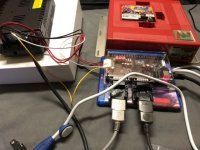
Got my Meanwell today and look who finally joined the club!

I need to test Undamned’s decoders (should be fine), and I need to run the MVS and Naomi through this. For the Naomi I need to set the PSU to 3.3v right? Also how do I access the service test menu on the HAS? I need to set free play and enable characters (RF2 and Marvel 2). I don’t have a GDROM set up yet, so I don’t need to be lectured about that. I already know that I will need a second PSU when the time comes (and a thanks and shoutout to Mitsurugi-X for his wonderful atx2naomi cables which I need to order).
 

Attachments

  • A85B83DA-6576-401C-9BA4-C643A45297C2.jpeg
    A85B83DA-6576-401C-9BA4-C643A45297C2.jpeg
    123.3 KB · Views: 207
  • DFC4CEC6-5680-4DD3-B049-78DAE70F2624.jpeg
    DFC4CEC6-5680-4DD3-B049-78DAE70F2624.jpeg
    108.1 KB · Views: 256
  • BE2788D2-C2C7-4B04-8B06-894E7CB56E35.jpeg
    BE2788D2-C2C7-4B04-8B06-894E7CB56E35.jpeg
    104.4 KB · Views: 211
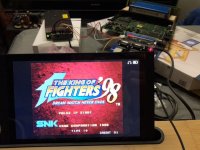
NeoGeo and Naomi work fine.


The Saturn adapters map perfectly to AW but they have a messed up MVS layout, it wasn’t giving me the proper row layout.

I have the CPS2 kick harness plugged in, but like the NeoGeo, the buttons aren’t mapped correctly for the Saturn 2 JAMMA.

I can’t seem to get the Undamned adapters to work so far either.
 

Attachments

  • 3EAD7FCB-3C84-45F8-A0EE-773776D3EC24.jpeg
    3EAD7FCB-3C84-45F8-A0EE-773776D3EC24.jpeg
    106.9 KB · Views: 240
  • 8206F7C5-9854-4040-B8FE-B1E20584E0E2.jpeg
    8206F7C5-9854-4040-B8FE-B1E20584E0E2.jpeg
    77.7 KB · Views: 230
Last edited:
Also how do I access the service test menu on the HAS?


The Saturn adapters map perfectly to AW but they have a messed up MVS layout, it wasn’t giving me the proper row layout.


I have the CPS2 kick harness plugged in, but like the NeoGeo, the buttons aren’t mapped correctly for the Saturn 2 JAMMA.

I can’t seem to get the Undamned adapters to work so far either.
Service menu - press the Service button.

Incorrect button layout - remap the button layout.

Undamned adapters work perfectly, which has been confirmed numerous times (I use the UD adapters personally, too).

It's all in the instruction manual, you should've read it before setting up the supergun. I don't know how to stress it, but it is crucial to read the manual, you can damage your equipment if you don't know what you are doing.
 
Also how do I access the service test menu on the HAS?


The Saturn adapters map perfectly to AW but they have a messed up MVS layout, it wasn’t giving me the proper row layout.


I have the CPS2 kick harness plugged in, but like the NeoGeo, the buttons aren’t mapped correctly for the Saturn 2 JAMMA.

I can’t seem to get the Undamned adapters to work so far either.
Service menu - press the Service button.
Incorrect button layout - remap the button layout.

Undamned adapters work perfectly, which has been confirmed numerous times (I use the UD adapters personally, too).

It's all in the instruction manual, you should've read it before setting up the supergun. I don't know how to stress it, but it is crucial to read the manual, you can damage your equipment if you don't know what you are doing.
I did read the manual, I read it with regards to everything about voltage, what not to do and to avoid any danger and for the setup.

Sorry for the silly questions, I just got too excited and got overwhelmed with what I was enjoying to find the things I was asking about. I know there’s a remapping option for the SAT2JAMMA (I should’ve mentioned that because it sounds like I’m complaining, I’m really not). And the same goes for Undamned’s decoders. For Undamned’s decoders I could also have incompatible arcade sticks, so it wouldn’t be his decoders’ fault. I may have owned arcade hardware for a few years but I’m only really new to the supergun game.
 
I did read the manual, I read it with regards to everything about voltage, what not to do and to avoid any danger and for the setup.
Probably best to read the whole manual. The HAS has a feature to remap your controls as well. So you could have multiple mapping conflicts with your HAS + SAT2JAMMA/Undamned.

And your post actually did seem like you were complaining, so I can see how RGB might have responded a bit more acidic.
 
Sorry if my post sounded like overreaction, I've become allergic to this type of messages. You'd be surprised (or not) how many messages I get with stuff like "I did something and now buttons don't register" or "I bought a kick harness from you, but the kicks don't seem to register".


lupinko said:
I know there’s a remapping option for the SAT2JAMMA (I should’ve mentioned that because it sounds like I’m complaining, I’m really not).
There's no remapping option for the SAT2JAMMA, remapping is only for the actual HAS unit.
 
Last edited:
I did read the manual, I read it with regards to everything about voltage, what not to do and to avoid any danger and for the setup.
Probably best to read the whole manual. The HAS has a feature to remap your controls as well. So you could have multiple mapping conflicts with your HAS + SAT2JAMMA/Undamned.
And your post actually did seem like you were complaining, so I can see how RGB might have responded a bit more acidic.
Sorry if my post sounded like overreaction, I've become allergic to this type of messages. You'd be surprised (or not) how many messages I get with stuff like "I did something and now buttons don't register" or "I bought a kick harness from you, but the kicks don't seem to register".


lupinko said:
I know there’s a remapping option for the SAT2JAMMA (I should’ve mentioned that because it sounds like I’m complaining, I’m really not).
There's no remapping option for the SAT2JAMMA, remapping is only for the actual HAS unit.
I know I’m sorry, I feel bad for posting the original message out of sheer ignorance. I didn’t mean to upset anyone. :(
 
  • Like
Reactions: RGB
The uploaded .brd is for the newest Autodesk Eagle. The 8pin mini DIN pinout is the same as XRGB mini. The HD-15 follows the VGA pinout, but instead of HSync on pin #13, there's CSync, that's all.
If you just want to test things quickly then the easiest way would be to use the HAS' CN5 AUX connector instead of the 8pin mini DIN.
 
The uploaded .brd is for the newest Autodesk Eagle. The 8pin mini DIN pinout is the same as XRGB mini. The HD-15 follows the VGA pinout, but instead of HSync on pin #13, there's CSync, that's all.
If you just want to test things quickly then the easiest way would be to use the HAS' CN5 AUX connector instead of the 8pin mini DIN.
Thanks. I am not sure I am not able to get a signal. I am using a Namco system 12 board (tekken 3). When I use the VGA connector on the arcade board which is connect via Extron to my CRT it works (15Khz) but nothing on MD8. I have connected MN8 to VGA connector as:
MD 8 --> VGA
3 -->-- 13
6 -----> 3
7 -----> 2
8 --->-- 1

HAS is currently on default settings (CYNC power level and “Buffered”)

Am i missing anything here ?
 
The uploaded .brd is for the newest Autodesk Eagle. The 8pin mini DIN pinout is the same as XRGB mini. The HD-15 follows the VGA pinout, but instead of HSync on pin #13, there's CSync, that's all.
If you just want to test things quickly then the easiest way would be to use the HAS' CN5 AUX connector instead of the 8pin mini DIN.
Thanks. I am not sure I am not able to get a signal. I am using a Namco system 12 board (tekken 3). When I use the VGA connector on the arcade board which is connect via Extron to my CRT it works (15Khz) but nothing on MD8. I have connected MN8 to VGA connector as:MD 8 --> VGA
3 -->-- 13
6 -----> 3
7 -----> 2
8 --->-- 1

HAS is currently on default settings (CYNC power level and “Buffered”)

Am i missing anything here ?
Found out the issue. I measured the V on CSync was around 1v however changing the Csync line (from to Dn8) to CN2 did the trick. Does that mean my device was expecting TTL level sync ?
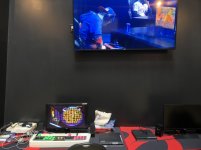
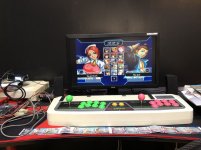
 
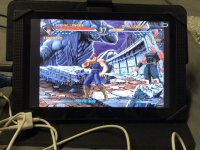
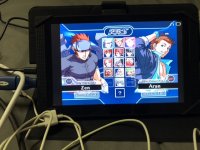
I brought my HAS setup to a local during CapcomCup, here’s two pics.

This was before I realized that the monitors had proper aspect ratio options. lol
 

Attachments

  • 7F0FEDCC-BEA3-4915-A096-5A701CCEBE4B.jpeg
    7F0FEDCC-BEA3-4915-A096-5A701CCEBE4B.jpeg
    190.7 KB · Views: 261
  • 7C21C583-2017-4762-81A0-1E7242CED423.jpeg
    7C21C583-2017-4762-81A0-1E7242CED423.jpeg
    298.5 KB · Views: 274
  • Like
Reactions: RGB
Found out the issue. I measured the V on CSync was around 1v however changing the Csync line (from to Dn8) to CN2 did the trick. Does that mean my device was expecting TTL level sync ?
I don't recommend using CN2 if you aren't 100% sure (check your monitor specs). Also, there's a 75R/TTL switch that affects CN5 and 8pin mini DIN outputs.
 
Back
Top