2 September 2018 HAS testing update, in the future I'll update this post vice making a new one:
At this time I have not needed to purchase a SCART cable to use with the OSSC at all. Please try my settings before spending an extra $20-25 on something you my not need. A small caveat is that you will not have a LPF in this scenario, resulting in very light image distortion most visible on solid backgrounds. See my note below about this. I will retest when I get my SCART cable.
I am using HAS 3.1, OSSC 1.6 FW .81, 8pin min DIN cable with the 8pin mini DIN to HD15 adapter PCB connect to the OSSC, with 3.5 audio cable for sound.
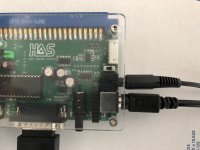
HAS 3.1 right side showing 8pin min DIN cable connection and 3.5mm audio cable. These two cables plug into the OSSC (see below). Note that on the HAS I have the jumper (JP2) 75 Ohm/TLL pulled off (meaning it is in TTL mode) and the Switch 1 (SW1) set to (B) Buffered for CSync.
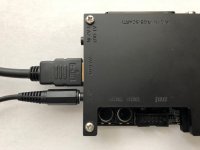
OSSC 1.6 version. Left side when looking from top. HDMI cable out and 3.5mm audio cable into OSSC port "A3 IN" from the HAS.
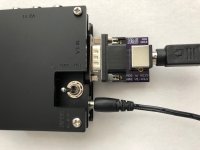
OSSC 1.6 version. Right side when looking from top. 8pin mini DIN to HD15 adapter PCB connect to the OSSC "V3 IN" port. 8pin min DIN cable plugged into it from the HAS. Lower cable is the OSSC power.
On OSSC the default setting for Pre/Post Coast is 1. You may have to set to something higher such as 4 to get a good sync for some games. I was able to get a sync on some games at 1 but I have read that others needed a 4 for the same game, so it could be odd tolerances between boards. Finally you must be in mode
AV3: RGBS (the first/default mode is
AV3: RGBHV).
Atomiswave : Dolphin Blue, Metal Slug 6 =
HAS=TTL, OSSC=Pre/Post Coast on 1, but had to mess with it initially by setting to 4. Now seems to work starting in 1. Set Atomiswave hi-rez dip switch to off, get 480i passthrough, looks like shit, and you must correct the aspect ratio in your TV settings.
HAS=TTL, OSSC=Pre/Post Coast on 1, but had to mess with it initially by setting to 4. Now seems to work starting in 1. Set Atomiswave hi-rez dip switch to on, get 480p passthrough, looks much better but you must correct the aspect ratio in your TV settings.
Capcom CPS2 : Dungeons & Dragons Tower of Doom (Phoenix ROMs) =
HAS=TTL, OSSC=Pre/Post Coast on 1, 3x mode looks best as it doesn't cut off top or bottom but is 720p and 5x mode is 1080p, however the top and bottom are cut off.
Irem M72 : Dragon Breed =
HAS=TTL, OSSC=Pre/Post Coast 1, 3x mode looks best as it doesn't cut off top or bottom but is 720p and 5x mode is 1080p, however the top and bottom are cut off. Also, bottom layer of this games screen is cut off (score, lives, time layer) at the default settings. To see it you have to adjust the settings under Advance Timing Tweaker. I set Vertical Sync Length to 6, Vertical Backporch Length to 30, and Vertical Active Length to 240. This allows you to see the full bottom line information and graphics, however the top is now cut off a bit. You could cut back on my settings to see the numbers, giving up a little bit of the graphics but gaining back the top line. Your call how you rock this.
Irem M92 : Major Title 2, Ninja Baseball Bat Man =
HAS=TTL, OSSC=Pre/Post Coast on 1, 3x mode looks best as it doesn't cut off top or bottom but is 720p and 5x mode is 1080p, however the top and bottom are cut off.
PGM : Demon Front, Espagaluda, The Gladiator, Oriental Legend, Photo Y2K, Photo Y2K 2 =
HAS=TTL, OSSC=Pre/Post Coast on 1, 3x mode looks best as it doesn't cut off top or bottom but is 720p and 5x mode is 1080p, however the top and bottom are cut off.
Taito F3 : Elevator Action Returns =
HAS=TTL, OSSC=Pre/Post Coast on 4, 3x mode looks best as it doesn't cut off top or bottom but is 720p and 5x mode is 1080p, however the top and bottom are cut off.
Sega STV : Radiant Silvergun =
HAS=TTL, OSSC=Pre/Post Coast on 4, 3x mode looks best as it doesn't cut off top or bottom but is 720p and 5x mode is 1080p, however the top and bottom are cut off.
Sega System 16 : Altered Beast, ESWAT, Golden Axe, Shinobi =
HAS=TTL, OSSC=Pre/Post Coast on 1, 3x mode looks best as it doesn't cut off top or bottom but is 720p and 5x mode is 1080p, however the top and bottom are cut off.
Not having a SCART cable makes it so you can play all PCBs with one cable, and avoid having to change the TTL to 75R, which is hard because the jumper is under the plexi, but there is one issue, see below.
*****Low Pass Filter. The HAS uses a THS7316, which doesn't have a LPF (at the frequency we are using for Arcade Boards), but that is normally good because the OSSC has a built in LPF. What you never want is, more than one LPF, or no LPF, so we should be set right? Yes, except the OSSC VGA input that we are using via the 8pin mini DIN to HD15 adapter doesn't have a LPF, so in essence, our feeds in this set up do NOT have a LPF at all, resulting in a picture that isn't as good as it could be. This is likely the reason I have some of the distortion I listed earlier below. Once I get my SCART cable, I'll post my results.******
The ONLY thing I think I noticed, and it's difficult to spot because you need a solid back ground and there is no way to pause arcade games, is that the images seem to have slight distortion in the solid back grounds. You can Google why LPF are important in old arcade/console image clarity to see some examples. It's not terrible, but I'll post more results when I get my SCART cable.
Anyway, a big thanks to RGB for the HAS, Jassin for his testing before hand that let me jump right into playing, and to James at JNX, who is always helping me get shit working!



 in the SCART hood.


