

I might but don't take my word for it, the priority is the newest HAS batch and a few other projects.I missed the boat on ordering a HAT that allows component video on my HAS, do you ever plan on making more? I know the PS2 connector won't be an option anymore but wondering if you had an alt in mind.
You are using an out of date browser. It may not display this or other websites correctly.
You should upgrade or use an alternative browser.
You should upgrade or use an alternative browser.
Home Arcade System
- Thread starter RGB
- Start date

zionfarm
Professional
Great work RGB the little CXA2075 came in the mail today. Soldering question for you and the group. Do I also need solder in the PB, GND, & PR holes? I see in your example that you got two switches soldered on the board, do I need those two switches for mine to operate as well?
Last question what are these little pins called that can help me solder those holes together?

Last question what are these little pins called that can help me solder those holes together?
Another sneak peek.
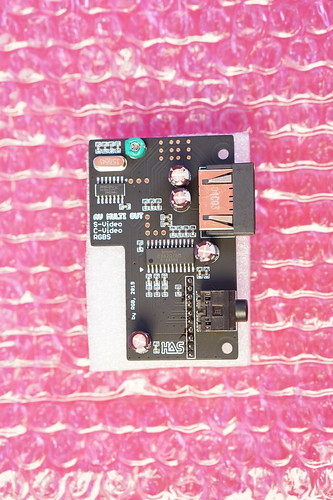
This is the CXA2075 based video encoder for the HAS. It outputs Composite Video, S-Video and DC coupled RGB via the PlayStation AV Multi. However, it can be easily upgraded to output Component Video (YPbPr) by installing the Viletim's NESRGB Component Video Board. I need to admit that the video quality is phenomenal with this addon.
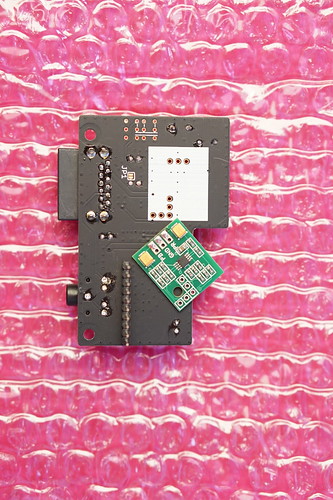
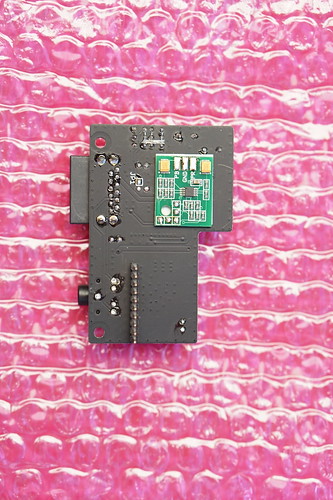
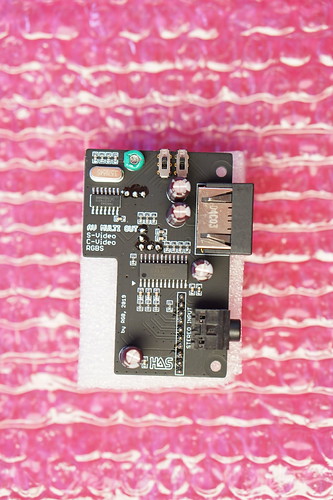
@zionfarm

- Cut 3 traces as shown above; bridge JP1.
- Install two switches, the following can be used: SSSS222700, JS202011CQN, CL-SB-22C-01
Do not use the supplied goldpin headers. Stick a piece of thin double sided tape underneath the add-on board and stick it to the adapter PCB. Then solder it using some tinned copper wire (use resistor's leg or something).Edit: I just had a quick look at my adapter board and it looks that the add-on board won't touch anything on the HAS, so the supplied goldpins could be used here.
Last edited:
zionfarm
Professional
Thank you so much for the heads up on this RGB.
Cheers,
Cheers,

shorjewken
Student
@zionfarm Sorry, I missed part of your question:
"Do I also need solder in the PB, GND, & PR holes?"
Yes, you need to populate all holes.
@shorjewken I don't have them, but I will make some.
"Do I also need solder in the PB, GND, & PR holes?"
Yes, you need to populate all holes.
@shorjewken I don't have them, but I will make some.
shorjewken
Student
Awesome! Would be happy to pre-order as well so let me know!

I've used 4-40 jackscrews to screw in theHas anyone here screwed their UD USB decoders into the HAS supergun? Wondering what size you used (the manual says DSUB screw locks with 10-11mm screw length but that's for the Saturn adapters - is it the same for the UD-USBs?)
ud-usb. If you are needing some ask @opt2not he might have some left. Hope that helps you

hidaniel
Enthusiast
Is there a waiting list for the waiting list? A mailing list I could subscribe to with an alert for when the next pre-order opens up?

Hey, the newest batch is in production! I'll make an announcement when it's ready.

Finally got my cable from Retro Access ( https://retro-access.com/collection...gb-cable-lead-for-nes-rgb?variant=47694594323 ) but I'm having issues.
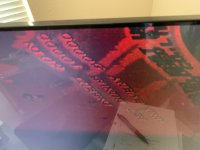
I'm getting a wavy, red screen with all the PCB's I test. (photo attached)
I've tried on multiple LCD TV's and computer monitors. All switches on the HAS are on the default as the manual suggests.
I'm using a cheap SCART/HDMI converter which is confirmed working when I plug my Genesis into it, as my OSSC has been shipping for 5 weeks now from China.
Anyone have any ideas what I'm doing wrong?
I'm getting a wavy, red screen with all the PCB's I test. (photo attached)
I've tried on multiple LCD TV's and computer monitors. All switches on the HAS are on the default as the manual suggests.
I'm using a cheap SCART/HDMI converter which is confirmed working when I plug my Genesis into it, as my OSSC has been shipping for 5 weeks now from China.
Anyone have any ideas what I'm doing wrong?
Attachments
Last edited:

the Goat
Grand Master
Is that the actual cable you bought from retro-access? It is the wrong one. You want Euro SCART not JP-21.Finally got my cable from Retro Access ( https://retro-access.com/collection...gb-cable-lead-for-nes-rgb?variant=47694594323 ) but I'm having issues.
I'm getting a wavy, red screen with all the PCB's I test. (photo attached)
I've tried on multiple LCD TV's and computer monitors. All switches on the HAS are on the default as the manual suggests.
I'm using a cheap SCART/HDMI converter, as my OSSC has been shipping for 5 weeks now from China, which is confirmed working when I plug my Genesis into it.
Anyone have any ideas what I'm doing wrong?
https://retro-access.com/collections/other/products/8-pin-male-mini-din-to-male-rgb-scart
Edit: Using a JP-21 cable with your SCART/HDMI converter could quickly damage your HAS or the converter. Stop experimenting until you get the correct cable.
Ugghhh!Is that the actual cable you bought from retro-access? It is the wrong one. You want Euro SCART not JP-21.
retro-access.com/collections/o…ini-din-to-male-rgb-scart
Edit: Using a JP-21 cable with your SCART/HDMI converter could quickly damage your HAS or the converter. Stop experimenting until you get the correct cable.
That is the cable I'm using. After searching many forums for the correct cable to buy, that is the one I was told would work.
It was a pain to finally be able to purchase it now it'll take a lot longer to get the other one.
Is it possible to open the connector & change pins?

Yep, Jap21 is the wrong cable. As soon as I saw all that red on screen I figured you made that mistake.
Grab a euro cable and don't power it on until you do.
Basically exactly what Goat said
Grab a euro cable and don't power it on until you do.
Basically exactly what Goat said

@zwooky I probably have a spare, maybe retro-access maybe the etim one. https://etim.net.au/shop/shop.php?crn=207&rn=544&action=show_detail
I can take a look and figure out a price if you want
I can take a look and figure out a price if you want
If you happen to have a spare retro-access cable I'd definitely be interested. Don't really wanna mess with the etim one.@zwooky I probably have a spare, maybe retro-access maybe the etim one. https://etim.net.au/shop/shop.php?crn=207&rn=544&action=show_detail
I can take a look and figure out a price if you want
It’s an etim but I can assemble it if you want.If you happen to have a spare retro-access cable I'd definitely be interested. Don't really wanna mess with the etim one.
That's OK. With all the isolation time I think I'm gonna try to re-pin my current cable.It’s an etim but I can assemble it if you want.If you happen to have a spare retro-access cable I'd definitely be interested. Don't really wanna mess with the etim one.
If for some reason I can't, I'll get one of these adapters;
https://videogameperfection.com/products/jp21-to-scart-adapter/