Home Arcade System

What are the life expectancies of your typical LCD/CRT, and professional grade LCD/CRT's?
My understanding is its not about total hours on the monitor so much as hours of viewing per day...

From a simple Google search:
Consumer TVs are designed to operate for the few hours a day someone is home, relaxing in front of TV shows, movies, or video games. Commercial televisions, by contrast, are specifically engineered to continuously operate between 16 and 24 hours per day, and up to 7 days per week

Screen/Glass – The screen itself is also a factor. Commercial grade screens often tout having enhanced glass modules designed for long hours of operation and that are less sensitive to image retention issues. “True commercial models use a commercial grade glass that has multiple layers allowing for 7/24/365 operation cycles.”

I can't really find hard numbers on total hours, but take the warranty for example.
On Consumer TV I'm seeing anything from 90 days to 2 years extended.
On pros I'm seeing 5 years parts and labor baseline.
 
Last edited by a moderator:
I'm not ever going to replace the monitor in the cab unless is breaks but eventually
WHEN it breaks, not unless... And yea, I'll see ya in about 5 years or less.Remember if your machine is used it came from an arcade floor where it was on basically 365.
Yes the LCD is a little more durable than your basic LCD TV, but they still aren't rated for anywhere near the life expediency of a CRT.

First the colors/contrast will wash out, then the brightness contrast will go... Before you know it you'll be looking at crap.
It's not, it's new (a customized chewlix) with a 1080p Samsung panel in it. But yeah! Thanks for all the knowledge drops man. Appreciate it very much.
 
Im gonna tear the monitor open to see if I can relocate controls.
You do you D, but I HIGHLY recommend you do NOT do this.
Reasons why...
  • Monitor has one button that functions like a POV hat and it sits deep inside the base of the frame
  • Monitor reverts to the last state perfectly (ie pull the AC plug and it shuts off, plug it back in and it turns back on no need for pwr button)
You should NEVER need to adjust anything on this monitor after dialing it in for HDMI1/Freesync/colors.
OSSC is always going to be outputting 1600x1200, only the syncs will be different and this is Freesync so...

Oh and finally you don't need to worry about "what if I wanted to use a different input" because this hasn't got any.
Its only HDMI and Display Port, and I can't get it to display ANYTHING from the OSSC via DP adapters (I suspect because its mega fancy DP2.4 or something).

If you want VGA, its going to be provided by OSSC.
For better or worse this is basically a one input wonder that has little to no use in the arcade world without an OSSC.

Unrelated, but since you also asked for a pic of the new feet installed...
xrUoX69.jpg
 
Last edited by a moderator:
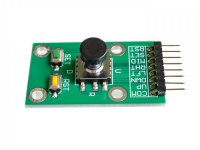
Thats fine, they are cheap enough monitors. I already duplicated/relocated controls on the Taito ones from behind the coin door to under the CP using a switch like this,

5-way Navigation switch_2-1000x750.jpg

makes them much easier to access and adjust monitors. But like you say once they are dialed in, shouldnt need to touch them. Plus the extra buttons serve as test/service as well.

Thanks for info :thumbup:
 
while we are in this, what's the play for connecting brooks boards to multiple systems? is that just something that needs a manual cable swap?
 
while we are in this, what's the play for connecting brooks boards to multiple systems? is that just something that needs a manual cable swap?
If you have a Switch involved, it definitely requires manually moving cables around as you have to hold down LK when inserting to put it into "Switch mode".

Whether a KVM or something similar would work for PC/PS4/XOne, not quite sure.
 
while we are in this, what's the play for connecting brooks boards to multiple systems? is that just something that needs a manual cable swap?
If you have a Switch involved, it definitely requires manually moving cables around as you have to hold down LK when inserting to put it into "Switch mode".
Whether a KVM or something similar would work for PC/PS4/XOne, not quite sure.
Interesting, ok! I have a KVM switch so I can try that when it arrives.
 
has anyone compared the retrotink 2x to the ossc for playing PCBs? I ask because I've got a vewlix en route and want to eventually be able to play my jamma boards in there too, via a supergun and scaler. I know the ossc will be "better" but I haven't been able to find any direct comparisons. I have an ossc for my console setup to test and see if it's even compatible with the monitor in the cab, but figured i'd ask here!
What you want is the Irken Labs Retro Scaler A1. There is a thread here on it as well. Fantastic results and much cleaner than OSSC in terms of stable pixels.
 
What you want is the Irken Labs Retro Scaler A1. There is a thread here on it as well. Fantastic results and much cleaner than OSSC in terms of stable pixels.
Cool! My monitor only takes DVI/HDMI, but I’ll look into it!
 
That ^ is why I say the A1 is for 31khz (aka VGA) CRT monitors.
IF you have a flat screen (LCD/OLED) you want digital (DVI/HDMI) and 720p~QHD support.

A1 only outputs 640x480 analog VGA, in 2020?!
 
Just need a VGA to DVI adapter/Cable then if you go the A1 scaler route.
Beware, most new monitors do not support analogue VGA signals over DVI so you should verify that first.
Thanks. I own and OSSC, FM and I've got a Tink 2x on the way, and I'm going to try them all out with my supergun, and if ordering a second ossc is the best option, that's what I'll do.
 
Managed to pick up a HAS, as I had a lot of trouble with an ebay seller providing a faulty Minigun Supergun. Working great, looking good, but I'm having an issue with at the moment just one board, but I've not tested every board I own.

I've tested an original cps1 Final Fight, a NeoGeo MV1FZ with a couple games, and bootleg Street Fighter 2 World Warrior and Bomberman Land (Bomber Lord) and they all work great. Although I have to turn the volume pots a little higher than I'd like, there's no volume adjustment on the HAS right? Unless I've just missed it.

But I can't get a signal to my OSSC from my bootleg Dynablaster (Bomberman) with the HAS. Does anybody know what might bee the first thing to check? I just get a black screen with the OSSC not detecting a signal. It's not a big deal, but I'm wondering if there's an easy thing I could try to fix it.

Board works fine in my Sega New Net City cabinet so, I think it's fine.

Cheers :)
 
Last edited:
I think I heard some where (probably was in @SmokeMonster video) that some bootlegs require higher 5v to work. Since they are bootlegs and the quality varies so hard to tell. But you might want to test set 5v bit higher (of course at your own risk).
 
Managed to pick up a HAS, as I had a lot of trouble with an ebay seller providing a faulty Minigun Supergun. Working great, looking good, but I'm having an issue with at the moment just one board, but I've not tested every board I own.

I've tested an original cps1 Final Fight, a NeoGeo MV1FZ with a couple games, and bootleg Street Fighter 2 World Warrior and Bomberman Land (Bomber Lord) and they all work great. Although I have to turn the volume pots a little higher than I'd like, there's no volume adjustment on the HAS right? Unless I've just missed it.

But I can't get a signal to my OSSC from my bootleg Dynablaster (Bomberman) with the HAS. Does anybody know what might bee the first thing to check? I just get a black screen with the OSSC not detecting a signal. It's not a big deal, but I'm wondering if there's an easy thing I could try to fix it.

Board works fine in my Sega New Net City cabinet so, I think it's fine.

Cheers :)
The pot was removed as a safety measure in case people run both the arcade game and the HAS on max audio volume.

As for the bootleg game, try unprocessed sync mode and TTL level (don't worry about overvoltage, there's a 470R inline resistor even in the TTL level setting).
 
I think I heard some where (probably was in @SmokeMonster video) that some bootlegs require higher 5v to work. Since they are bootlegs and the quality varies so hard to tell. But you might want to test set 5v bit higher (of course at your own risk).
I never said anything like that, but thanks for thinking of me ;)
 
Back
Top