Home Arcade System

what arcade board have you tried ? sometimes vertical game boards could have issues (atleast in my exerpeience). Can you try some other board and see if you still rolling screen issue.
It's a CPS III board,going to a CRT.
IMG_9315.jpeg
 
@Jxmx3 - I just checked the retrovision page, and it looks like their adapter/cable takes RGBS, so it should work fine (as long as your TV accepts low-res Component Video signal).
I was wrong about it. I checked the FAQ on their page and it clearly says:

"Do your SNES or Genesis cables use CSYNC to avoid the noise from composite video?

The SNES/Genesis YPbPr cables do not use CSYNC. However, through the custom design of our cable and its circuitry inside we are able to extract sync from composite video without introducing noise. The two main reasons for this are (1) we are not driving a full video load, and (2) composite video is only traveling over a short distance before being terminated.

So now that I know CSYNC isn't used by the SNES or Genesis YPbPr cables, do I still need to wire it up when used with [insert-any-DIY-mod-here]?

Sorry, we do not support any DIY console modifications and cannot offer any assistance with working on and/or installing them."

My adapter doesn't populate the Composite Video pin. @merrygoomba I apologize for this. If you got my adapter solely to use it with the hdretrovision cable based on my earlier response, then please drop me a line, and I'll refund you.

I will have one user test the adapter with a fix that maps the CSync to the Composite Video pin as a workaround for the hdretrovision cable. I'll share the results here.
 
Work and Family have been busy for me and i still have not yet had a chance to get mine setup and tested.

but really looking forward to getting this up and running. I wont need any kind of refund, im sure this awesome community will figure something out on how to get them to work.

In the meantime something like the retrotink hd15 to scart cable and the rgb2comp should work to get component on a crt tv ?

I have not had a chance to do much research on the retrotink 4k ce but has anyone had any success using this for the HAS to downscale to get component video on a CRT ?
 
Work and Family have been busy for me and i still have not yet had a chance to get mine setup and tested.

but really looking forward to getting this up and running. I wont need any kind of refund, im sure this awesome community will figure something out on how to get them to work.

In the meantime something like the retrotink hd15 to scart cable and the rgb2comp should work to get component on a crt tv ?

I have not had a chance to do much research on the retrotink 4k ce but has anyone had any success using this for the HAS to downscale to get component video on a CRT ?

I have a HAS 4 and a HAS 5 with the original Mini din instead of the HD15 port
I do however have the Mini Din to HD15 Adapter by RGB as well

I wasn't able to test out that HD15 cable much but it did work on my OSSC which I used an HDMI to Component transcoder to pass through the 240p signal to my CRT TV

I would assume the Retrotink HD15 to Scart Cable and RGB2COMP Setup to work as well. You might run into issues with some boards like the PGM not because of your setup but because some boards are problematic.

I've used the Retrotink RGB2COMP with Scart and it works great along with many other RGB to Component Transcoders

An alternative when I have issues with my CRT TV with problematic boards like the PGM I connect the RGB signal from the HAS to my OSSC then use an HDMI to Component Transcoder and it ends up working pretty good

btw you don't need to downscale 240p/480i signals you just need to pass them through

If your looking at the Retrotink 4K or an OSSC Pro because they have downscaling available that's not needed
You can just pass through your signal with an original OSSC

Hope that info helped you somewhat
 
Work and Family have been busy for me and i still have not yet had a chance to get mine setup and tested.

but really looking forward to getting this up and running. I wont need any kind of refund, im sure this awesome community will figure something out on how to get them to work.

In the meantime something like the retrotink hd15 to scart cable and the rgb2comp should work to get component on a crt tv ?

I have not had a chance to do much research on the retrotink 4k ce but has anyone had any success using this for the HAS to downscale to get component video on a CRT ?
I'm having a little FOMO for not purchasing the HD-15 to SNES Multi AV output adapter for my HAS 5.1.

I've it doesn't work out for you, I'd be happy to purchase it from you.

-Dan
 
I was wrong about it. I checked the FAQ on their page and it clearly says:

"Do your SNES or Genesis cables use CSYNC to avoid the noise from composite video?

The SNES/Genesis YPbPr cables do not use CSYNC. However, through the custom design of our cable and its circuitry inside we are able to extract sync from composite video without introducing noise. The two main reasons for this are (1) we are not driving a full video load, and (2) composite video is only traveling over a short distance before being terminated.

So now that I know CSYNC isn't used by the SNES or Genesis YPbPr cables, do I still need to wire it up when used with [insert-any-DIY-mod-here]?

Sorry, we do not support any DIY console modifications and cannot offer any assistance with working on and/or installing them."

My adapter doesn't populate the Composite Video pin. @merrygoomba I apologize for this. If you got my adapter solely to use it with the hdretrovision cable based on my earlier response, then please drop me a line, and I'll refund you.

I will have one user test the adapter with a fix that maps the CSync to the Composite Video pin as a workaround for the hdretrovision cable. I'll share the results here.
Hello @RGB ,thanks for the response,no need for a refund,I'll be keeping the adapter as I can probably use it for future applications and I'm sure someone will eventually come up with a fix.
In the meantime I'll revert back to using my HAS 4.1 which does work with the PS1 style dongle and PS1 HD retrovision cable.
IMG_9572.jpeg
 
Last edited:
I’m glad I picked up the ps2 hat for my version of the HAS when I could. I just now have a use for it, especially for outputting composite or s-video.
Me and the local FGC in SoCal are running monthly 3rd Strike tournaments and have a couple TV’s that take composite only. We use those TV’s for additional setups or casual stations.
The ps2 hat is handy for these cases!
IMG_0471.jpeg


Differences between using the PS2 Hat’s RGB vs Composite output:
RGB
IMG_0469.jpeg

(ugly) Composite
IMG_0470.jpeg


I’ve yet to get the viletim component board to install on it. But since that addition requires cutting traces, I’m wondering if installing the component board with remove any other functionality of this hat. I mean, will I still have composite, s-video, and rgb output if I install the viletim composite board?
IMG_0463.jpeg
 
TV’s that take composite only. We use those TV’s for additional setups or casual stations.
This is why I kept my Composite/S-Video boards around. Not everyone I know is going to have a Sony PVM or similar with SCART readily available, so having this as an alternative option is great. At least I can get some games up and running.
 
Hello @RGB ,thanks for the response,no need for a refund,I'll be keeping the adapter as I can probably use it for future applications and I'm sure someone will eventually come up with a fix.
The fix was tested and confirmed to work perfectly with the HD Retrovision SNES cable :)

54900787302_c1344d3f49_w.jpg


It requires a bodge wire between the CSync and the Composite Video pins, as shown in red. Set the CSync on the HAS to 75R (deselect "TTL CSync Level").
 
@RGB Just got the new HAS in along with PSU adapter. Also big ups to this man for including the HD-15 to SNES Adapter. I really appreciate that brother.
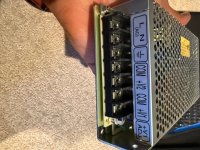
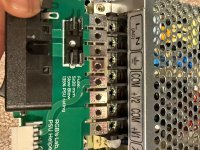
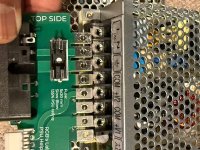
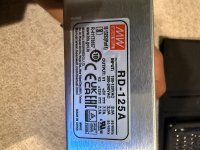
I do have a question for the group about the PSU adapter fitment to a Mean Well RD-125A. For some reason the PSU Helper PCB is not lining up with my PSU. Could this be an off print of either the PSU Helper PCB, or the Mean Well?

Photos below for reference.

V/r
Kelly
 

Attachments

  • IMG_2829.jpeg
    IMG_2829.jpeg
    232.4 KB · Views: 40
  • IMG_2830.jpeg
    IMG_2830.jpeg
    236.7 KB · Views: 40
  • IMG_2831.jpeg
    IMG_2831.jpeg
    255.1 KB · Views: 43
  • IMG_2828.jpeg
    IMG_2828.jpeg
    200.2 KB · Views: 46
@RGB Just got the new HAS in along with PSU adapter. Also big ups to this man for including the HD-15 to SNES Adapter. I really appreciate that brother.
I do have a question for the group about the PSU adapter fitment to a Mean Well RD-125A. For some reason the PSU Helper PCB is not lining up with my PSU. Could this be an off print of either the PSU Helper PCB, or the Mean Well?

Photos below for reference.

V/r
Kelly
Disregard guys, I am an idiot. The FAQ says Mean Well models RT, & I have a RD Jesus Devonta Christ. I got the wrong model.
 
Disregard guys, I am an idiot. The FAQ says Mean Well models RT, & I have a RD Jesus Devonta Christ. I got the wrong model.
Ha, I did the same thing recently! Not a good feeling at all after you spend 30 minutes probing voltages only to realize you accidentally ordered the wrong supply and didn't even notice.
 
The fix was tested and confirmed to work perfectly with the HD Retrovision SNES cable :)

54900787302_c1344d3f49_w.jpg


It requires a bodge wire between the CSync and the Composite Video pins, as shown in red. Set the CSync on the HAS to 75R (deselect "TTL CSync Level").
Thanks! I'll get to work on this on the weekend,I'll post the results.
 
So a quick recap: with few electronics experience (again, I’m a software guy), but a lot of patience, will to learn and understand and the help of a good multimeter and ChatGPT I traced down the problem to the HD74LS05P after tracing all the paths between the DAC resistors and several ICs… basically it handles the common dark bit and the shadow register… it seems to be stuck on the pins for the blue channel, resulting in darker blues and therefore in a yellowish image.

My technician will replace it and possibly socket it along with the two HD74LS273P.
I'm glad to report that after replacing the HD74LS05P, the white and the colors are perfect. Both the HAS Supergun and the SCART cable were perfectly fine.

Thank you again.
 
  • Like
Reactions: RGB
Re. No image from HAS V5.1 into Sony Trinitron KV-21X5U Consumer CRT TV

Hello,

I hope you are all well. I can't get an image from my HAS V5.1 into my Sony Trinitron with my 2x Atomiswave boards, or MV2F. This is my first arcade gaming setup. I do have sound with my Atomiswave, though. I don't have any games to test with my MV2F. I've tried both the 'MiSTer FPGA' RGB cable from Retro Computer Shack and a RetroTink RGB cable that arrived today. I also can't get video from my MVF2 (I've only tried that board with my Retro Computer Shack cable).

A listing for the MiSTer RGB cable which has detail about the wiring and spec:

https://www.ebay.co.uk/itm/255117620498

The RetroTink cable is probably more widely known/ used and was recommended by Bob at RetroRGB for the HAS.

I have the following chain:

VGA one end into the HAS and scart the other, into my Bandridge 5 Way Scart Switcher, then into my Sony Trinitron 21X5U. I've tried the Computer Shack cable directly into my TV and I still had no image. Everything is as you would expect, PSU plugged in and I had the Saturn 2P adapter plugged in with a Saturn controller.

I had the DIP switch on the Atomiswave set to 15 kHz (up), as my Trinitron can't accept 31 kHz.

I've tried reading the HAS manual and Googling but I am still stumped. I've tried toggling CSYNC TTL and Raw CSYNC and LPF check boxes on/ offf.

The Computer Shack and Tink cables have the CSYNC signal on pin 20 of the scart plug, with a 470 Ohm resistor for attenuation, which is what I understand is needed.

Big P chimed in and said, "The 470ohm resistor may be causing a slightly week signal as I am pretty sure the HAS is already attenuated but it should still work".

VGA out from the HAS into my LCD monitor works fine with the AW dip set to 31 kHz, albeit at default settings the image is dimmer and less punchy compared to the VGA out from the AW board directly.

I hope I've covered all of the details you might need to help me out with this and thank you in advance for reading this. If anyone can suggest anything, or knows what might the issue might be, I would gratefully appreciate it.


Kind thanks,

fallinlight
 
Have you tried both ports of your TV? Quickly skimming the manual for your unit, only Port 1 is RGB capable.

Connect directly from HAS to your TV and not through your SCART switch.

TTL should be off for a consumer TV and sounds like you’ve toggled the raw CSYNC and LPF settings correctly, flip between them with no board connected and then plug in a try. Do not adjust with game attached.

Photo below shows DIP and their expected positions for AW.

IMG_2756.jpeg


Neo Geo will show crosshatch with no cart attached.

Can you try another TV or 15k RGB capable screen.

Does 15k output work on your 31k display? Try that and report back.
 
Back
Top