Yes, I have them both set to 192.168.1.2
Nevermind, that's right. I forgot you set the target IP in the Piforce settings. That's correct then.
Yes, I have them both set to 192.168.1.2
I tried swapping out the sticks one at a time. Each of the 256mb and the 512mb from the other netdimm, no luck.Try only one 256mb, if fail, remove and try other one 256mb. Insert to slot 1
Ps
sometimes the RAM (SIMM) passes the test well, but NetDimm was not completely compatible. Sometimes you need to order other SIMM PC133 chip

I tried swapping out the sticks one at a time. Each of the 256mb and the 512mb from the other netdimm, no luck.
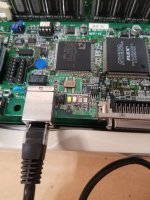
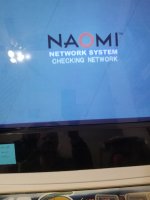
I am starting to think the issue is the pi. While trying to connect to it, none of the network indicator lights on the board lit up. As a last resort I disconnected the pi from the dimm and connected a standard ethernet cable from my internet router to the dimm. Not only did the lights come on, but I also got the checking network screen.

you do NOT need a crossover cable.If I recall, you need to use a corssover cable if directly connecting the pi and netdimm.
Noted: there are guides out there that list it as a requirement, I couldn't recall for sure.you do NOT need a crossover cable.
oh. pi-force tools. MY BAD. I think you're actually correct.Noted: there are guides out there that list it as a requirement, I couldn't recall for sure.
https://8bitplus.co.uk/projects/netboot-with-raspberry-pi/
You are doing NOTHING to eliminate my uncertainty! (kidding)oh. pi-force tools. MY BAD. I think you're actually correct.

I had same issue and it was the brand new pi itself. Network wasn’t working at all. Got a new one put the exact same sd card in it and it immediately worked.I tried swapping out the sticks one at a time. Each of the 256mb and the 512mb from the other netdimm, no luck.
I am starting to think the issue is the pi. While trying to connect to it, none of the network indicator lights on the board lit up. As a last resort I disconnected the pi from the dimm and connected a standard ethernet cable from my internet router to the dimm. Not only did the lights come on, but I also got the checking network screen.
That seems to have been my problem as well. I just got in a Pi from another seller and voila, it works.I had same issue and it was the brand new pi itself. Network wasn’t working at all. Got a new one put the exact same sd card in it and it immediately worked.
My bad one also came from an aliexpress seller from China that sold the universal bios and zero key together. He also kept trying to act like it was user error and wouldn’t refund meThat seems to have been my problem as well. I just got in a Pi from another seller and voila, it works.
I'm sure most people on this forum have already set up networking on their Naomi years ago, but for those who are new to this like myself it can be frustrating.
To figure out what was the actual culprit I tried the new Pi sd card in the bad Pi and it did not work. (Strangely enough, the sd card from the bad Pi works perfectly in the new Pi) I also tried swapping out the lcd with the one from the new Pi (just in case something could have been soldered wrong) still no bueno.
The dates on both are the same, 2011. However, the Pi that works was made in the UK and the bad one was made in ......... China.
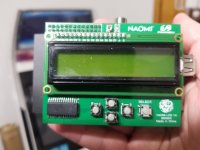
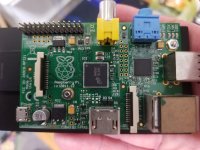
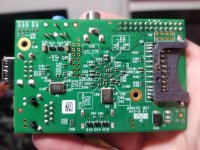
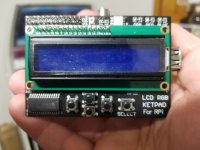
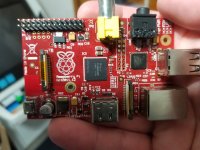
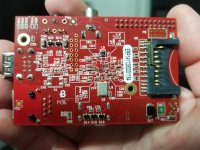
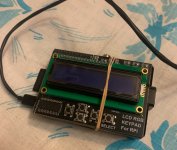
For anyone who may be looking at purchasing one from AliExpress I am including pics to help differentiate between the two.
Green LCD w/NAOMI printed on it & Green Pi = Good 1st three pics
Green and Black LCD & Red Pi = Bad Last three pics
The bad Pi used Piforce Tools v 1.5 and the good Pi had WiPi Netbooter on the sd card.
An added note, Piforce Tools loads much faster than WiPi Netbooter on the functioning Pi.
Thanks to everyone that chimed in with help!!!!


Considering this is the defentive guide for netboot, seems like now the crossover cable is not needed (straight ethernet cable works as well), wondering if this section needs to be updated?7. A Cross-over Cable.
The Net-DIMM board needs to connect to the Raspberry-Pi over a valid network. Theoretically you could use a single R-Pi to net boot multiple consoles on the same network. This guide wont go into that. In the case where you'd connect the R-Pi directly to the Net-DIMM board we'll need a Cross-Over cable. Regular Ethernet cables cannot be used without a networking switch between the R-Pi and the Net-DIMM board.

I'm kinda stuck I got PI3 + Adafruit i2c 16x2 RGB (18 pin) that works with Piforce no problem.
I got PI2 and assembled new Adafruit i2c 16x2 (16 pin) but Piforce doesn't load, I can see blocks on the screen but no back light.
Interestingly If I put Adafruit i2c 16x2 (16 pin) on PI3 it works no problem with back-light turning on.
I've removed from lcd.backlight(lcd.BLUE) and changed busnum from 1 to 0 but still makes no difference.
Could this be problem with my PI2 board?