
You are using an out of date browser. It may not display this or other websites correctly.
You should upgrade or use an alternative browser.
You should upgrade or use an alternative browser.
Irken (MiSTer) JAMMA Expander
- Thread starter invzim
- Start date

invzim
Champion
I would say highly likely, as the expander only uses standard connecors/interfaces and not GPIO pins. You may have to get a USB cable to connect it, as I don't htink any of the clones use a usb micro OTG port, but a standard USB A instead / pin headers.Is the Jamma Expander compatible with the new DE-10 clones coming to market?
invzim
Champion

geotrig
Student
- Joined
- Jul 21, 2015
- Messages
- 50
- Reaction score
- 42
I tried it but no joy yet, not getting any video out , could be a crappy SD card but I also didn't realise at first that on taki's board the USB c connector on one side is for debugging only, only saw this after watching takis setup vid so need another cable or adaptor to connect the otg cable connections similar to the qmtech on need a type a to type a . I'm out of action for a few weeks so may not get back to setup soon, can't see why it wouldn't work though
Last edited:
geotrig
Student
- Joined
- Jul 21, 2015
- Messages
- 50
- Reaction score
- 42
Managed to get to properly hook this up briefly today with taki s board and looks to work as expected, you will need an different "type A female to type A, male otg usb cable" and an adapter to convert the power connector to USBC for it to work
Last edited:
invzim
Champion
MisterPI finally tested, https://irkenlabs.com/mister-pi-de10-clone-mini-review/

Main challenge is powering the thing, which can be done with a DC-to-USB-C adapter/cable thingie, or you can roll your own by soldering on a connector and making a custom cable.
Main challenge is powering the thing, which can be done with a DC-to-USB-C adapter/cable thingie, or you can roll your own by soldering on a connector and making a custom cable.

only1eko
Beginner

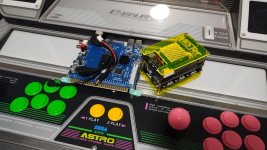

I love this device but I have one problem, I have control issues with the neo geo. All arcade core controls work well but the one console core i use has issues. Is there a way to make the neo geo core behave like the rest of the arcade cores?
The issue is that 2p doesnt work in keyboard mode and joystick mode is missing the functionality that I need.
The issue is that 2p doesnt work in keyboard mode and joystick mode is missing the functionality that I need.
invzim
Champion
The blackwine MVS core behaves like normal arcade, works without any remapping and you get one entry pr game - so you don't have to fiddle in the menus to load a specific game. It's some time since I did it last, but this one should do it for youI love this device but I have one problem, I have control issues with the neo geo. All arcade core controls work well but the one console core i use has issues. Is there a way to make the neo geo core behave like the rest of the arcade cores?
The issue is that 2p doesnt work in keyboard mode and joystick mode is missing the functionality that I need.
https://github.com/funkycochise/Insert-Coin
Alternative is to switch to gamepad mode on the expander, more fiddly
https://irkenlabs.com/jamma-expander/operation-gamepad/


geekmiki
Enthusiast
Hi,
I've been talking with @invzim regarding a control mapping issue and since he had no particular advice, I'm trying here.
I've had a JAMMA expander for a while, working correctly in gamepad mode. I have mapped all the inputs once in the MiSTer menu and then I usually I have to map them by game to have coin working and 1 and 2 not inverted.
Some cores like Sunset Riders (any version) or Rolling Thunder simply don't take into account the mapping defined for the game. Coin just doesn't work and in the service menu I can't navigate up or down. The JAMMA expander is registering the inputs, so it's not that.
I decided to delete all the input configs from the SD card and start "fresh" in keyboard mode, just to test. Same thing happens with the problematic cores. For instance, Sunset Riders won't coin up.
Any suggestions? I guess it should be working since I can't find anyone mentioning a particular issue with this core.
I've been talking with @invzim regarding a control mapping issue and since he had no particular advice, I'm trying here.
I've had a JAMMA expander for a while, working correctly in gamepad mode. I have mapped all the inputs once in the MiSTer menu and then I usually I have to map them by game to have coin working and 1 and 2 not inverted.
Some cores like Sunset Riders (any version) or Rolling Thunder simply don't take into account the mapping defined for the game. Coin just doesn't work and in the service menu I can't navigate up or down. The JAMMA expander is registering the inputs, so it's not that.
I decided to delete all the input configs from the SD card and start "fresh" in keyboard mode, just to test. Same thing happens with the problematic cores. For instance, Sunset Riders won't coin up.
Any suggestions? I guess it should be working since I can't find anyone mentioning a particular issue with this core.

ShootTheCore
Legendary
Sounds like a core-specific bug. File a bug report with Jotego here:
https://github.com/jotego/jtcores/issues?page=1
https://github.com/jotego/jtcores/issues?page=1
geekmiki
Enthusiast
I would actually be very grateful if someone could test and confirm they can reproduce the issue before reporting a bug to Jotego.
EDIT: Just to further test and discard that it could be something with my configuration, I've set up a new SD card with everything freshly installed and the issue persists.
EDIT 2: A bit embarrassing, but it was actually because of an old jtbin.zip. Updated to the latest release and everything was working again.
EDIT: Just to further test and discard that it could be something with my configuration, I've set up a new SD card with everything freshly installed and the issue persists.
EDIT 2: A bit embarrassing, but it was actually because of an old jtbin.zip. Updated to the latest release and everything was working again.
Last edited: