
MEGA ADAPTERS - Plug and Play PC in SEGA Racing Cabinets

I had a few tries to see how TeknoParrot and Flycast run on a few low end PC configurations, and also to confirm that Outrun 2 SP SDX looks fine on a 4:3 CRT (spoiler: it does)
The PC is a Dell Optiplex 3020 with a 4th gen i5 processor, 8GB of RAM, and a graphics card.
- When the graphics card installed in this PC was a GT 1030, Flycast ran fine, but OR2 (TeknoParrot) had significant issues on performance at first try (running smooth at 60fps but with some short freezes, quite often). Second try was better, but still with some freezes.
- When the graphics card was a GTX 1050, Flycast ran well and OR2 still had a few small freezes at first try. On second try it was perfectly smooth.
Here is a video of this last try:
 
Last edited:
Yes it works, I tried it. It's just a matter of button mapping.
Couldn't get the outputs (lamps) working properly yet though, even with BigPanik's DemulShooter Special Edition dedicated to this game. I'll give it a few more tries. Even if I don't succeed, it will be possible to make the lamps blink, but independantly from what happens in the game...
Hi I've finally got around to installing this.
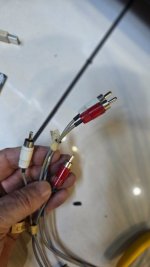
I need advise please on the connections. There is a cabinet usb cable input and 4 audio inputs that in unsure of.
The usb cable included with your package obviously goes from your Mega board to the PC, does the cabinet USB plug into the PC too? Audio will be an issue?
Attached are pictures of the screen and the board, usb and audio cables.
Cheers
Bob
20250811_150708.jpg
20250811_150319.jpg
 

Attachments

  • 20250811_150327.jpg
    20250811_150327.jpg
    64.3 KB · Views: 27
Hi Bob,

Be careful, the "USB" cable you had in the cabinet is a JVS cable, not USB, even though it looks the same. Don't use it, it would harm your PC.

You need to plug the Mega Adapter where the IO board sits. The installation will be similar to what you see in this video:
View: https://youtu.be/W4AHt0lVRGQ?si=XhQhgpoAJnoy44HS


For the moment, you can unplug your Control Panel Mini (the blue board with a lot of buttons, plugged in the Mega Adapter). You'll plug it back in only if necessary (for diagnostic purposes, or to control the PC on a desk outside the cabinet).

For your Audio cables, the original Sega Amp has RCA inputs. You can either:
- go straight from the PC to the Sega Amp with a Jack to RCA audio cable
- use a jack to Female RCA adapter and reuse the original RCA cable on the Hikaru side, like I did in the video

EDIT: you need to leave a keyboard and a mouse plugged to the PC for Demul not to crash
 
Last edited:
Hi tibal,
I’m trying to diagnose a r-tuned with no steering motor action.

Motor just dosent power up .

I used a multi meter on the cable that brings the power up to the motor ..

But I’m unsure if
The motor servo only puts volts out when ffb is active in game ?

Or volts are constantly driven up to the motor and clutch is just in gaged when wheel is asked to pull ? Any ideas ?
Anyways here are my readings across the 3 wires using the 4th green ground wire for ground .
IMG_6274.jpeg
IMG_6279.jpeg
IMG_6277.jpeg

Any help appreciated thanx
 
Hi,
The Type C motor you have doesn't have a clutch.
Do you have the red LED blinking on your Servoboard? Or is it always on or off?
Which system are you using? Original Lindbergh? PC?
 
Hi thanks
Yeh realized i don’t have the clutch ..

Yeh red led blinks on the motor driver board .👍

I’m using original Lindbergh.


((But I also do have a pc with a
Gamoover Universal force feedback board and aganyte motor controller pcb in a f355 cab ..))

I’m just trying to Connect with Lindbergh multi 👍
 
Last edited:
A blinking LED on the Servoboard means the communication with the game system is not set, if I remember correctly. Maybe you should dig in that direction
 
Here is a new model of Mega Adapter, designed for Sega Strike Fighter cabinets.

1000045635.jpg


Jurulz successfully tested it and shot some photos, videos, aircraft and starships:

1000052059.jpg

1000052058.jpg


View: https://youtu.be/j5R_ORb4xjw?si=MuJe-owOk6fKwwE_


View: https://youtu.be/m9ReY-vx4aU?si=IGz92oAUJo-sloFr

EDIT: one more video :)
View: https://youtu.be/EDnQaF1ao4g?feature=shared


I'll update the first post soon :)

I see on the pictures for the sega strike fighter a curved monitor. I already tried to contact jurulz but no answer. Does anybody know which monitor that is ?
 
I think most curved 32" or 31.5" should do.
Many people I know use Philips 325e1c or 322e1c when they want curved LCDs. Maybe Jurulz uses one of them too
 
They rely on BackForceFeeder, which is made for Windows. So no, out of the box it wouldn't work with Batocera.
 
They rely on BackForceFeeder, which is made for Windows. So no, out of the box it wouldn't work with Batocera.
Ok, I have a friend who has 3 daytona usa 2 cabinets, and I figure if we are upgrading to PCs in the cabinets, might as well run as many racing games as possible. What do you suggest using with it to make it work? Retrobat on Windows and Steam ok? Do I need other software? He's about to order three of these boards. Also, do I still need to connect them with the optical cables for multi-player on some games?
 
Back
Top