NAC Splitfire: JAMMA streaming solution

have you fiddled with the brightness knob on the splitfire? also what pcb are you using, or are you trying to capture naomi

I have, I've adjusted it either way and still nothing. Yes, I'm trying to capture Naomi. I've just tried plugging the HDMI into a monitor and nothing on that either.
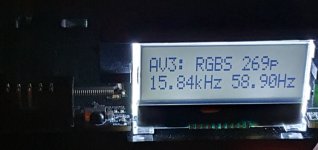
The OSSC is displaying:

AV3: RGBS 269p
15.84Khz 58.90Hz

I've got the Naomi going to the Capcom I/O via VGA, then the Splitfire into the Capcom I/O, following by Jamma into the Astro. The game plays perfectly on the cab, just nothing past the OSSC.

It IS an older model OSSC, and it came with a DVI to HDMI adapter that seems to work ok. I've tried many of the settings on the OSSC too, including setting all to passthru.
 
Be careful with the Micomsoft drivers. I seem to recall that it would cause havoc in Windows, although this was a long time ago and I could be wrong. IIRC there was something about it really liking to cause BSODs on Win7.

Since you have an OSSC, you don't really need a 15khz capable capture card since you can just have the OSSC line double to higher resolutions. The only trouble is that arcade boards tend to be pretty finicky, as you're finding out right now. For the Naomi, I would skip the Splitfire, use a good quality VGA splitter, and connect a VGA cable directly from the splitter to the OSSC (the other splitter head goes to the Capcom IO to give your cab video).

From there, I personally use a Magewell USB HDMI Capture Gen 2 (on ebay for ~$70 used), which should give 4:4:4 60fps at 720p. I've also used cheaper USB 2.0 based capture cards at 4:2:2/4:2:0 30FPS with success such as the Genki Shadowcast and the similar generic stuff all over Amazon/eBay.

I've captured CPS2, Neo Geo, and Sega System C2 so far without issue. I have a Naomi which I can also try to capture with an OSSC when I have time. The SNES has been an unusual struggle with my setup due to jitter issues.

Is there any other boards you want to capture, or just Naomi?
 
Be careful with the Micomsoft drivers. I seem to recall that it would cause havoc in Windows, although this was a long time ago and I could be wrong. IIRC there was something about it really liking to cause BSODs on Win7.

Since you have an OSSC, you don't really need a 15khz capable capture card since you can just have the OSSC line double to higher resolutions. The only trouble is that arcade boards tend to be pretty finicky, as you're finding out right now. For the Naomi, I would skip the Splitfire, use a good quality VGA splitter, and connect a VGA cable directly from the splitter to the OSSC (the other splitter head goes to the Capcom IO to give your cab video).

From there, I personally use a Magewell USB HDMI Capture Gen 2 (on ebay for ~$70 used), which should give 4:4:4 60fps at 720p. I've also used cheaper USB 2.0 based capture cards at 4:2:2/4:2:0 30FPS with success such as the Genki Shadowcast and the similar generic stuff all over Amazon/eBay.

I've captured CPS2, Neo Geo, and Sega System C2 so far without issue. I have a Naomi which I can also try to capture with an OSSC when I have time. The SNES has been an unusual struggle with my setup due to jitter issues.

Is there any other boards you want to capture, or just Naomi?

Thanks for the quick reply! You know, I was just wondering about coming direct from the Naomis VGA, but didn't think of using a VGA splitter! I wonder if it's the Capcom I/O in conjunction with the Splitfire causing havoc. I can get quarter of a picture to capture in OBS if i connect the VGA directly to my capture card, but not the full screen.

Good idea. What VGA splitter would you recommend?

Regarding capturing other things, I'm getting a Mister at some point, and I believe I'll then need an irkenlabs jamma also, after the splitfire. For now though, getting this naomi captured would be great!
 
Ok, so the OSSC was showing 268p or 269p. I just disconnected the VGA and reconnected whilst running live, and it's now showing 537i on the same setting! I think it might be this damn Capcom I/O at this point buggering the signal, even though audio is perfect on the line in.

I think you're on the money with the VGA splitter!
 
I have, I've adjusted it either way and still nothing. Yes, I'm trying to capture Naomi. I've just tried plugging the HDMI into a monitor and nothing on that either.
The OSSC is displaying:

AV3: RGBS 269p
15.84Khz 58.90Hz

I've got the Naomi going to the Capcom I/O via VGA, then the Splitfire into the Capcom I/O, following by Jamma into the Astro. The game plays perfectly on the cab, just nothing past the OSSC.

It IS an older model OSSC, and it came with a DVI to HDMI adapter that seems to work ok. I've tried many of the settings on the OSSC too, including setting all to passthru

why not just split the VGA ?edit: oops too late response
 
MiSTer capture should theoretically be easier because you can manipulate and force different resolutions and refresh rates, so there's less worry about unusual video signals (without modifying video settings, I would imagine whatever issues you get would be similar to real hardware).

For a splitter, I would search for the cheapest used Extron branded model on eBay. They may be chunky, but Extron stuff is pro grade quality all they way down to the cable, and relatively affordable when buying used. The super cheapo, wire only splitters that you can get for a few bucks are not recommended, as they will severely affect image quality, on top of darkening it.

I'll fiddle around with Naomi capture after work tonight, since I haven't really tried it myself.
 
MiSTer capture should theoretically be easier because you can manipulate and force different resolutions and refresh rates, so there's less worry about unusual video signals (without modifying video settings, I would imagine whatever issues you get would be similar to real hardware).

For a splitter, I would search for the cheapest used Extron branded model on eBay. They may be chunky, but Extron stuff is pro grade quality all they way down to the cable, and relatively affordable when buying used. The super cheapo, wire only splitters that you can get for a few bucks are not recommended, as they will severely affect image quality, on top of darkening it.

I'll fiddle around with Naomi capture after work tonight, since I haven't really tried it myself.

So now the OSSC is showing RBGHV with VGA connected directly to the Naomi I/O (currently no display on my cab, to be expected) but i'm still getting the same issue! It's capturing the top left quarter of the Naomi only, whether that's direct through the OSSC or direct to the Startech USB3HDCAP. That's using either HDMI or DVI :(

The detected resolution is 640x245P at 60FPS in the CY3014 USB configure video settings. This eliminates the Capcom I/O and splitfire from being the issue then...
 
Try 480p, skipping the cab, to keep it as simple as possible. It should be Naomi 480p > VGA cable > OSSC > Capture Card > PC. 480i might not be playing nice with your capture card (probably this) or the OSSC, but lets make sure with an easier resolution first. Resolution switching should be a dip switch setting on the Naomi.

I'm at work for another 3-4 hours, so it'll be a while before I have my hands on my own Naomi and gear to try.
 
I can verify with my own setup that what I discussed should work. I was able to capture video for both 480i and 480p directly from the VGA port on the Naomi, as well as through a VGA splitter.

One important thing to note is that the OSSC seems to have a bit of trouble syncing correctly to 15khz (~537i) every once and a while. If you flip between the line multipliers, it should eventually be able to correctly interpret the interlaced signal, instead of seeing it as ~268p.

I didn't capture much footage in game because Naomi is a giant PITA and takes forever to load games.

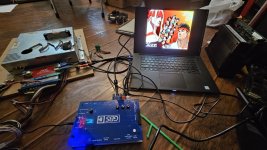
Pictures shown in order: 480p capture, 480i capture, and 480i with a splitter to capture card and another display. In your case, the secondary display would be your arcade cab instead. I was too lazy to drag all this mess into my Astro City for a quick test.

IMG20230502200049.jpg
IMG20230502200422.jpg
IMG20230502201415.jpg
 
So now the OSSC is showing RBGHV with VGA connected directly to the Naomi I/O (currently no display on my cab, to be expected) but i'm still getting the same issue! It's capturing the top left quarter of the Naomi only, whether that's direct through the OSSC or direct to the Startech USB3HDCAP. That's using either HDMI or DVI :(

The detected resolution is 640x245P at 60FPS in the CY3014 USB configure video settings. This eliminates the Capcom I/O and splitfire from being the issue then...
What profile are you using for ossc. i use the dreamcast from firebrandx and it worked smoothly for me

http://www.firebrandx.com/OSSC/OSSC - Sega Dreamcast - Toro VGA Optimal Timing.txt
 
I can verify with my own setup that what I discussed should work. I was able to capture video for both 480i and 480p directly from the VGA port on the Naomi, as well as through a VGA splitter.

One important thing to note is that the OSSC seems to have a bit of trouble syncing correctly to 15khz (~537i) every once and a while. If you flip between the line multipliers, it should eventually be able to correctly interpret the interlaced signal, instead of seeing it as ~268p.

I didn't capture much footage in game because Naomi is a giant PITA and takes forever to load games.

Pictures shown in order: 480p capture, 480i capture, and 480i with a splitter to capture card and another display. In your case, the secondary display would be your arcade cab instead. I was too lazy to drag all this mess into my Astro City for a quick test.

IMG20230502200049.jpg
IMG20230502200422.jpg
IMG20230502201415.jpg
Thank you so much for doing this to try help.

My OSSC is the older version that has a DVI port on it. Here's an image of what it displays when using a VGA cable directly from the Naomi itself

I once got it to show 537i, but it keeps flicking between 268 and 269p, which explains why my OBS sometimes shows only quarter of a picture :( So are you saying that unless I see 537i, I won't be able to capture any signal from the OSSC, so just keep flicking on/off until I see 537i?

Could this be down to the long VGA cable I have purchased? It is an Amazon one, but a good quality one with good reviews. I did notice that pin 9 is missing from the grey VGA cable that runs from the Naomi to the Capcom I/O, but if I'm taking the signal direct from the Naomi to my OSSC, a standard cable should be ok, right..?
 

Attachments

  • 20230502_205923.jpg
    20230502_205923.jpg
    142.8 KB · Views: 109
Last edited:
Try 480p, skipping the cab, to keep it as simple as possible. It should be Naomi 480p > VGA cable > OSSC > Capture Card > PC. 480i might not be playing nice with your capture card (probably this) or the OSSC, but lets make sure with an easier resolution first. Resolution switching should be a dip switch setting on the Naomi.

I'm at work for another 3-4 hours, so it'll be a while before I have my hands on my own Naomi and gear to try.
Sorry, I'm a bit of a noob with the Naomi as I've just got it ;) Is this done physically on the device, or can it be done from the power supply buttons and GUI?
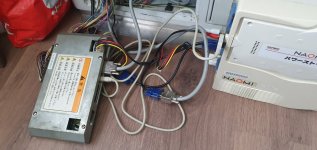
 
Good news guys, it's working! As soon as I saw 537i, I knew I was in business.

This is using the grey VGA cable that comes with the Capcom I/O, so would it make a difference with pin 9 missing, or is it just that the VGA cable is very good quality?
 
I'm glad you got it working.

To answer your earlier question on resolution switching, there's a bank of 4 dip switches near the top left of the Naomi, same side where the VGA port is. The first switch on the left determines 15 or 31khz output.

1683146435762.png


For VGA cables, IIRC pin 9 isn't normally connected to anything. More than likely it's the quality of the cable. I didn't notice before that you're based in the UK, so I'm not sure if this applies to you, but Extron sells a lot of pro grade video equipment and cables, and you can often find them used online for very cheap prices. Otherwise, you can try to figure out what's the most popular UK based pro video manufacturer, and you can probably stumble upon similar deals. Many companies bought massive amounts of analog equipment for many years, and usually dump them after the switch to digital/HD.

If you have any other questions, PM me or start a thread on the Sega section. I feel like we're probably straying a bit far from the topic of this thread now.
 
I'm glad you got it working.

To answer your earlier question on resolution switching, there's a bank of 4 dip switches near the top left of the Naomi, same side where the VGA port is. The first switch on the left determines 15 or 31khz output.

1683146435762.png


For VGA cables, IIRC pin 9 isn't normally connected to anything. More than likely it's the quality of the cable. I didn't notice before that you're based in the UK, so I'm not sure if this applies to you, but Extron sells a lot of pro grade video equipment and cables, and you can often find them used online for very cheap prices. Otherwise, you can try to figure out what's the most popular UK based pro video manufacturer, and you can probably stumble upon similar deals. Many companies bought massive amounts of analog equipment for many years, and usually dump them after the switch to digital/HD.

If you have any other questions, PM me or start a thread on the Sega section. I feel like we're probably straying a bit far from the topic of this thread now.
Thanks so much for your time and advice, I really appreciate it, along with anyone else who chipped in.

I've got a splitter arriving today to try. It's a good one, but cab return for free if it doesn't work. I should be good from here, it's just a case of getting a good VGA splitter and perhaps anote cable. I know that if I see 537i, I'm good to go. At first when I saw this, I assumed it was a fault as I was expecting to see 480i/p ;)
 
The splitter worked a treat! I've also pulled the audio directly off the Naomi as it was a bit jank off the Capcom I/O. This gives me the ability to play the cab later at night without speakers on and get perfect sound through headphones next to me :)
 

Attachments

  • 20230505_112818.jpg
    20230505_112818.jpg
    140.3 KB · Views: 149
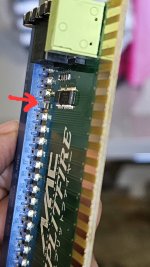
I'm having an issue with my new splitfire. I barely got a chance to test it out with the GBS-C and once I sorted out the image issues, things were chugging along nicely. My Jab button was not working and after ruling out my cabinet, I isolated the issue to the splitfire. Upon close inspection I noticed it was missing solder on the player 1 button 1 jamma finger. A quick continuity check with my meter confirmed, I quickly resolved that with some solder and the button worked again. It worked for about 30 minutes and then when I switched hardware to test out the GBS-C with other PCB's I lost sync.

I have isolated it do the Jamma finger on the splitfire for SYNC (P on the solder side) - but it's not missing solder on the actual jamma edge. It seems to be losing continuity somewhere in the circuit. It does not make it to the other side of the PCB. Has anyone ran into a similar issue?
 

Attachments

  • 20230507_163849.jpg
    20230507_163849.jpg
    140.3 KB · Views: 162
I'll be interested to see how well it works. I haven't tried an AliExpress GBS-C and the OLED addition would be nice if it means I don't have to connect my phone to it every time I want to change a setting. Make sure the Wifi works since signal interference was an annoying design flaw of the GBS-C AIO. It looks like the EPS8266 module is pretty far from the video processor on this design, so hopefully that isn't an issue here.

Got around to trying it and it works just fine on cps2 and cps3 hardware


@Anselmo Just curious but which model GBS-C are you using?
I'm using this one:

https://www.aliexpress.us/item/3256804918329035.html?channel=twinner
 

Attachments

  • 20230513_124700.jpg
    20230513_124700.jpg
    189.2 KB · Views: 156
Back
Top