El_isra
Professional
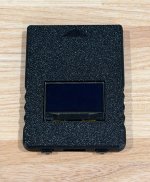
yeah it is the same one haha, turns out I didn't need to shave much as I got it to fit and have tekken 5 dr workingI am not the one who you are quoting, but i did the same. I shaved of the complete beveled edge around the display and made it the same level as the rest of the module. Looks ugly but works. (we are are talking about the bitfux sd2psx arent we?) do you need photos?


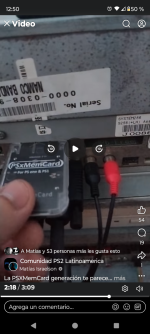
is there a way to programmatically change the loaded image on these from a Raspberry Pi to work with the ODE and Pi Selector setup?For the system 256, those who don't care of the display or the buttons, may buy PSxMemCard gen1
It's cheaper and fits on the 256 effortlessly
Not sure what you mean there. Change the ODE mounted image from MMCE device? Or change mounted dongle on MMCE device From the ODE?is there a way to programmatically change the loaded image on these from a Raspberry Pi to work with the ODE and Pi Selector setup?
I'm talking about this: https://www.arcade-projects.com/threads/namco-2x6-pi-multi-selector.17220/page-3#post-276625Not sure what you mean there. Change the ODE mounted image from MMCE device? Or change mounted dongle on MMCE device From the ODE?

I'm talking about this: https://www.arcade-projects.com/threads/namco-2x6-pi-multi-selector.17220/page-3#post-276625
It uses electric_monk's ODE Drive replacement along with a raspberry Pi with an OLED selector and Brizzo's multi Dongle.
you select the game on the Pi, then it re-flashes the Brizzo Dongle and selects a new image on the ODE.
I'd like to be able to update the Pi code to work with the PSXMemCard Gen 1 to replace the Brizzo Dongle.
Right now the dongle is reflashed by serial over USB, but with the PSXMemCard we can pre-load all dongles and just switch. The only question is how do we switch? can it be selected over USB or some other connection? how does GameID work in this scenario?

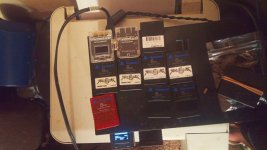
Did you ever make that cheat sheet? LoLThanks this is awesome, it worked fine on 256 with a shaved sd2psx. I'll need to make a cheat sheet of what games are on what card/channel. Unfortunately I've discovered I got no sound on my 256 I need to figure out.
here is one I found:Did you ever make that cheat sheet? LoL

Pls make sure the PSXMemCard/SD2PSX does not have a debug firmware installedHello, so i used this image, tested on 256 with an original HDD works fine. Afterwards, downloaded the internet aarchive folder, burned capcom fighting jam, put it in 246 rev B, result blue screen ; bad boot file. Any idea?
Thx for the fast reply Isra. Version is 1.0.0-RC1, Debug No. The PSxMemCard Gen 2 is booting and loading on 246B too, but system is not liking it. It works with external power too, but still having blue sceen with Boot Program Error, Boot File is not rightPls make sure the PSXMemCard/SD2PSX does not have a debug firmware installed
Also, if the issue persists, try connecting the card to a PC with an USB c cable, then plug it to the 246B and see if it works. If it does work with external power, let me know so that I can report the issue
InterestingThx for the fast reply Isra. Version is 1.0.0-RC1, Debug No. The PSxMemCard Gen 2 is booting and loading on 246B too, but system is not liking it. It works with external power too, but still having blue sceen with Boot Program Error, Boot File is not right
I just did, same result, tried Basara too.Interesting
Please update firmware to 1.3.0 stable release
https://sd2psxtd.github.io/download
Maybe the encryption of the boot.bin on the dongle image is not right
Seems to me like not all the dongle images have the correct binding to their boot fileAnd weirdly enough, Tekken 4 is working
 PSXMemCard
 Okay I guess that solved thatSeems to me like not all the dongle images have the correct binding to their boot file
Please, take the problematic dongle images and process them with this script
It can batch rebind the boot.bin files to SD2PS
https://github.com/israpps/israpps/raw/refs/heads/main/dongle_rebind.7z
now it's passing that but stuck on black screen on both jam and basara, tekken 4 same as before, getting to first screen then stuck on grey. I think that's the DVD drive struggling (a random samsung). I'm receiving another 246B this week end with original DVD drive, i'll keep you posted. Thx for the help!