
You are using an out of date browser. It may not display this or other websites correctly.
You should upgrade or use an alternative browser.
You should upgrade or use an alternative browser.
Home Arcade System
- Thread starter RGB
- Start date


RetroRGB
Student
- Joined
- Jul 21, 2015
- Messages
- 40
- Reaction score
- 70
The fact that the HD15 adapter has a csync / TTL jumper is amazing. Little things like that make such a big difference in people's setups!!! I'd usually leave it on csync, but one of my capture cards and some Extron equipment I use requires TTL and its nice to know it;s just a jumper swap away!

CoinFeeder
Professional
@RGB: What's the recommended setup to connect two devices (OSSC + PVM) to the HAS, e.g. when you wanna play on your PVM but stream via OSSC/capture device? I'm pretty sure a VGA splitter cable will work, but not sure the HAS is designed for handling that. Would you rather recommend an component/splitter?
geosnow
Professional
You do not need an OSSC for the PVM.
OSSC is only for non CRTs.
OSSC is only for non CRTs.

I don't think you understood what he was asking.You do not need an OSSC for the PVM.
OSSC is only for non CRTs.
He wants to play on a PVM, and stream from the OSSC at the same time.
@CoinFeeder I use a matrix switch for this set-up. I have a Shinybow 6x2 SCART matrix switch that works perfect for this situation. My HAS/Consoles are plugged into the Shinybow, one output to my PVM, while the other output is connected to my upscaler attached to my capture card.
The shinybow is a bit expensive, but there might be other options out there that are cheaper.
CoinFeeder
Professional
@opt2not: Cheers mate. I actually have all my consoles hooked up to the gscartsw_lite, with one output going to a Framemeister and one to the PVM. With the HAS I'm going via VGA to the OSSC and/or the PVM (via VGA -> BNC cable) at the moment, and I'd love to keep that separate, or scartless for nowI don't think you understood what he was asking.You do not need an OSSC for the PVM.
OSSC is only for non CRTs.
He wants to play on a PVM, and stream from the OSSC at the same time.
@CoinFeeder I use a matrix switch for this set-up. I have a Shinybow 6x2 SCART matrix switch that works perfect for this situation. My HAS/Consoles are plugged into the Shinybow, one output to my PVM, while the other output is connected to my upscaler attached to my capture card.
The shinybow is a bit expensive, but there might be other options out there that are cheaper.
 So my question is if it's ok to use a simple Y splitter cable or if that would draw too much on the HAS.
J
jassin000
It will likely "work" but I expect the image would be darker due to the extra draw on the video signal.simple Y splitter cable
It's also possible (but I think less likely) that it will not work at all, because the sync has become too weak to lock.
CoinFeeder
Professional
Awesome sauce, I didn't really think about daisy chaining, e.g. using the PVM output and connect that to the OSSC. I should have all the cabling needed for that, I'll give it a go tonight. Cheers!I hope this contributes to your original question but my streaming/recording setup goes like this:@opt2not: Cheers mate. I actually have all my consoles hooked up to the gscartsw_lite, with one output going to a Framemeister and one to the PVM. With the HAS I'm going via VGA to the OSSC and/or the PVM (via VGA -> BNC cable) at the moment, and I'd love to keep that separate, or scartless for now
HAS 3.1 w/ Retro Access 8 pin to SCART -> RGC Breakout into PVM input -> RGC RGB to Male SCART [with input/output toggle] into PVM output -> OSSC -> HDMI to LGP then USB into the computer.
The quality looks really good on both ends, even when I daisy chain another PVM, it works very well. I considered using a gscartsw_lite with my setup but I canceled my recent pre-order and stuck with this instead. Had a friend come over to practice Puyo Puyo 2 and while he was playing, I was recording his 1CCs on Hardest and adjusting the things on the recording side.

kazanova225
Student
how can I get on the list for HAS?I'm sending PMs in waves - if you made it on the list, you will receive a PM.

Trenton_net
Beginner
Perhaps this is a dumb question, but is there any way to use the HAS without having a proper arcade power supply with terminal prongs? I guess there's no way to just plug in a 12v power adapter or something that uses a barrel plug?

PascalP
Legendary
You need 12v and 5v, but you could adapt an ATX or Pico PSU if you would like.Perhaps this is a dumb question, but is there any way to use the HAS without having a proper arcade power supply with terminal prongs? I guess there's no way to just plug in a 12v power adapter or something that uses a barrel plug?

ShootTheCore
Legendary
True, but an arcade power supply is strongly recommended anyway because different arcade boards draw different amounts of power. An arcade power supply has an adjustment dial so you can dial each board into the ideal proper voltage specific to that board. Without adjustment, some boards will run too rich and some boards will run too lean.You need 12v and 5v, but you could adapt an ATX or Pico PSU if you would like.Perhaps this is a dumb question, but is there any way to use the HAS without having a proper arcade power supply with terminal prongs? I guess there's no way to just plug in a 12v power adapter or something that uses a barrel plug?
Is your concern based around having the terminals exposed? I know there are some Arcade PSU's that have a terminal guard cover, but I haven't been able to find any here in the USA. Perhaps 3D printing a cover would be the right way to go to address the safety issue of having exposed live connections.Perhaps this is a dumb question, but is there any way to use the HAS without having a proper arcade power supply with terminal prongs? I guess there's no way to just plug in a 12v power adapter or something that uses a barrel plug?

This is my issue, exposed main power terminals. I wouldn't stick my tongue in there but I have pets / children and wouldn't put it passed them to stick their nose in it.
@djsheep is testing a Happ arcade PSU with adjustable 5V and no exposed terminals, I've sent him an adapter harness early this week so we should have results soon. It's similar in appearance to an ATX.
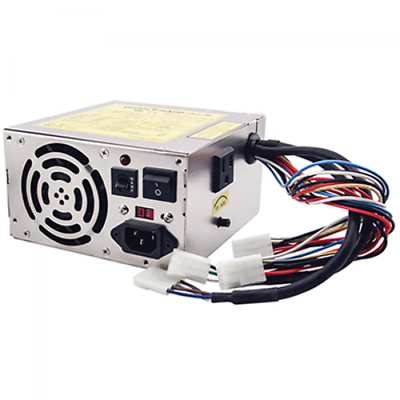
Personally I find ATX better. They're usually better built with more safety features and protection, and I believe they can automatically adjust the 5V to demand via the sense line. There may be a very small handful of picky boards that require the adjustment dial, but it's a worthy trade-off in my opinion to have clean, safe power for the vast majority of boards.
Of course there are exceptions, there's some very nice arcade PSUs out there, but they cost more money and typically people go for a cheaper option and those cheap Chinese jobs don't have overload / short circuit protection.
@djsheep is testing a Happ arcade PSU with adjustable 5V and no exposed terminals, I've sent him an adapter harness early this week so we should have results soon. It's similar in appearance to an ATX.
Personally I find ATX better. They're usually better built with more safety features and protection, and I believe they can automatically adjust the 5V to demand via the sense line. There may be a very small handful of picky boards that require the adjustment dial, but it's a worthy trade-off in my opinion to have clean, safe power for the vast majority of boards.
Of course there are exceptions, there's some very nice arcade PSUs out there, but they cost more money and typically people go for a cheaper option and those cheap Chinese jobs don't have overload / short circuit protection.
J
jassin000
The only dangerous arcade PSU terminals are the AC lines.
Sure I wouldn't go sticking my tongue on the 12v screw, but it won't really hurt/kill ya (just won't feel very pleasant at all).
As @opt2not said, a 3D printed terminal cover exists.
You could also use something cheap like a small wooden box.
Sure I wouldn't go sticking my tongue on the 12v screw, but it won't really hurt/kill ya (just won't feel very pleasant at all).
As @opt2not said, a 3D printed terminal cover exists.
You could also use something cheap like a small wooden box.
Perfectly stated!True, but an arcade power supply is strongly recommended anyway because different arcade boards draw different amounts of power. An arcade power supply has an adjustment dial so you can dial each board into the ideal proper voltage specific to that board
Last edited by a moderator:

Bar one PCB (Time Killers) I had absolutely no problems running an ATX power supply on a Supergun. Everything worked and ran within safe limits -- I'm pretty sure with a recap, Time Killers would probably run fine anyhow.This is my issue, exposed main power terminals. I wouldn't stick my tongue in there but I have pets / children and wouldn't put it passed them to stick their nose in it.
@djsheep is testing a Happ arcade PSU with adjustable 5V and no exposed terminals, I've sent him an adapter harness early this week so we should have results soon. It's similar in appearance to an ATX.
Personally I find ATX better. They're usually better built with more safety features and protection, and I believe they can automatically adjust the 5V to demand via the sense line. There may be a very small handful of picky boards that require the adjustment dial, but it's a worthy trade-off in my opinion to have clean, safe power for the vast majority of boards.
Of course there are exceptions, there's some very nice arcade PSUs out there, but they cost more money and typically people go for a cheaper option and those cheap Chinese jobs don't have overload / short circuit protection.
The only reason I'm bothering with an Arcade PSU aside from testing purposes is being able to play that one extra board but more importantly I have a cat who would have no qualms licking a 240v exposed terminal
 -- Roast Cat -- It's also nice to be able to offer tested options to the community, and that particular PSU is relatively cheap directly from SuzoHAPP and offers adjustable 5v and a power switch too.
The Spaniard
Professional

Nope. It's the one in the pic. Like this:
https://www.ebay.com.au/itm/112899352929
The one in your link has exposed terminals, which is why the other one was recommended.