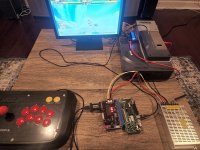
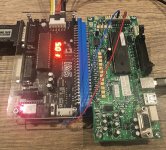
Home Arcade System

Buy or make your own one of these to see what goes where https://www.tops-game.jp/products/detail.php?product_id=6283
those are neat but I don't see the advantage over a jamma label on the side.

He's saying to use one of these and wire your stuff to it. It's not going to degrade anything

https://www.arcaniac.com/collection...3-96mm-0-156-pass-through-fingerboard-adapter
That's what I figured, but I was trying to avoid that "Chain" of thought
 
those are neat but I don't see the advantage over a jamma label on the side.
The advantage is being able to use it on any harness if you have multiple, I just use a printout though.

That's what I figured, but I was trying to avoid that "Chain" of thought
Nothing wrong with it and it won't cause any problems (otherwise nobody would use RECO or pre-JAMMA to JAMMA adapters etc)
 
I have a crazy request for the next revision.

Can we get a physical coin box to plug into the HAS?

I love the act of dropping coins to play arcade and dumping the bucket out to see my real life savings and score.

What do you guys think?
I have a personal project like this. I have a second DB15 port on my stick that will connect to an Asahi 100 yen coin drop. A box would need to be built to hold the coin shoot. I haven't decided if I'm going to ask my dad to make a nice wood one or if I'll ask my brother to draft something up that can be made at a metal shop for a small run. I don't know how many people would be interested in such a thing considering a lot of active members here own cabs.

Edit: all this second DB15 port has is ground and the "select" button wired to the terminal post of a brook retro board; the other DB15 is fully wired up to the terminal post on a Brook UFB. Both boards are connected, so everything is wired together. When I drop in a coin, it "pushes" the select/coin button on the other DB15 that is hooked up to the supergun. PM me if you need pics too see the setup, I'm not going to clog this thread with it. I'll publically post about it when the project is done.

If you wanted to go really simple with it, just wire the coin shoot to your select button on your DB15 port, done. It doesn’t matter if you have it wired to a button and the shoot. You can put more than wire in each terminal slot. There are two other ways I could have wired mine up on my stick; it isn’t picky, I just did what I did because of the layout inside my stick.
 
Last edited:
Hi all,

I'm having an issue with my Naomi + HAS setup. I mainly play Capcom vs SNK 2 and can't seem to get the 6th button to work.

During the Game Test Mode Input section the 6th button does not register when pressed.

The Sega IO 838-13683-93 Rev. B is set to Jumper A.
HAS 4.2 DIP Switch SW2 has buttons 4 through 6 set to ON.

Also did the button configuration following the HAS manual, when I set the 6th button I can see the status led blink.
But after saving the configuration, the 6th buttons still not working.

I might be missing something on my setup to get the button to work.
Any advice is appreciated.
 

Attachments

  • Naomi_HAS.jpg
    Naomi_HAS.jpg
    382.4 KB · Views: 173
@Helios the HAS is chamma compatible, but your IO is not. You need to hook up the kick harness connector to get button 6 to work. And you need to disable button 6 on the HAS otherwise it will always be pressed (button 6 to ground). On HAS it's JST XH 6 pin, and on the IO side it's a 14 pin JST NH. You need pin 4 and 8 for P1 B6 and P2 B6.

http://triplemoonstar.brinkster.net/theshed/images/naomijamma.gif
 
Last edited:
While we're tossing out goofy ideas... AvramCE's OpenMVS consolization kit is basically a supergun (with no kick harness support) broken into a bunch of pieces and fit into a console-like shell, and with A/V tuned for the MVS's RGB.

That made me think: I don't see any reason why a supergun designer couldn't make a generic consolization kit. The community could create PCB-specific 3D cases (edit: with access to dips, pots, LCD selectors...). AFAIK the main issue is whether there's enough of a market for it, since the arcade crowd is very comfortable with superguns and cabinets.

Personally, I love consolization kits. A standalone supergun like HAS gives me ultimate flexibility, but if I had the option, I'd love to have a bunch of console-like devices with small AC adapters than either A) plugging and unplugging PCBs to my supergun every session, or B) lining up a bunch of superguns and arcade PSUs on the shelf.
 
He's saying to use one of these and wire your stuff to it. It's not going to degrade anything

https://www.arcaniac.com/collection...3-96mm-0-156-pass-through-fingerboard-adapter

Wow, I was just thinking I needed one of these for my CPS2 multikit, but I didn't know they existed.

I'm using twistedsymphony's LCD holster and my HAS JAMMA extension with the acrylic & spacers was too fat to fit in that tiny space, so I had the bare PCB just flopping around ever since. This passthrough is definitely what I need here, right? And no problems with the PCBs possibly flexing from the weight of the JAMMA extension?

EDIT: Never mind, the female end of RGB's HAS JAMMA extension fully assembled with the acrylic will fit together with Bit District's Multi LCD Holster, but you need to raise the entire CPS2 by 1 cm or so.
 
Last edited:
Wow, I was just thinking I needed one of these for my CPS2 multikit, but I didn't know they existed.

I'm using twistedsymphony's LCD holster and my HAS JAMMA extension with the acrylic & spacers was too fat to fit in that tiny space, so I had the bare PCB just flopping around ever since. This passthrough is definitely what I need here, right? And no problems with the PCBs possibly flexing from the weight of the JAMMA extension?
Yeah all something like that does is extend the JAMMA edge. Whether it's right for your specific application, no idea as I don't use a LCD holster
 
@Helios the HAS is chamma compatible, but your IO is not. You need to hook up the kick harness connector to get button 6 to work. And you need to disable button 6 on the HAS otherwise it will always be pressed (button 6 to ground). On HAS it's JST XH 6 pin, and on the IO side it's a 14 pin JST NH. You need pin 4 and 8 for P1 B6 and P2 B6.

http://triplemoonstar.brinkster.net/theshed/images/naomijamma.gif
I connected the HAS CN4 P1 B6 and P2 B6 to the Sega JVS CN3 pin 4 and 8.
Also used my multimeter to confirm continuity between each point.

but still having the same problem, button 6 on the arcade stick still not working.
 

Attachments

  • HAS_JVS.jpg
    HAS_JVS.jpg
    280.4 KB · Views: 195
Just to troubleshoot, can you program button 6 to a different physical button and test it. (Hold down two buttons, hold start until red led on HAS blinks, and pick a new button to be button six, press it 6 times, you'll see the red-led blink, then press start).
 
I connected the HAS CN4 P1 B6 and P2 B6 to the Sega JVS CN3 pin 4 and 8.
Also used my multimeter to confirm continuity between each point.

but still having the same problem, button 6 on the arcade stick still not working.

You've got them on the wrong way around buddy. If you'd be using the JST NH connector you'd see the pin numbering is correct in the schematic, but the numbering should start at the left side in your picture.
 
You've got them on the wrong way around buddy. If you'd be using the JST NH connector you'd see the pin numbering is correct in the schematic, but the numbering should start at the left side in your picture.
After the switching the cables to the left side, the 6P started working.

Thank you so much.
 
Last edited:
Hoping the S-Video adapter becomes available again sometime in the near future. I have a 36 inch Toshiba that'd be awesome to use with the unit but the best it can do is S-video.
 
I've been happily using my HAS supergun for years. Last night Buttons 2,3,4,5,6 all stopped working for Player 1. Any idea how I should start diagnosing this?
 
Enter the rapid-fire configuration and leave the configuration with the start button in order to clear any rapid-fire that could've been accidentally programmed. Next, if still doesn't work, enter the button remapping mode and set a new button layout. If none of that works, PM me.
 
Back
Top