
You are using an out of date browser. It may not display this or other websites correctly.
You should upgrade or use an alternative browser.
You should upgrade or use an alternative browser.
DARKSOFT New Namco System 2 Multi
- Thread starter Darksoft
- Start date

nnap
Grand Master
Now I see it, must have been the perspective of the image. All good then!the manual shows the JP15 on the left as well as the manual. Where did you see that?

You don't need to remove them all, only those that collide with the multi. Actually you can just bend them if you don't like soldering or don't have the equipment for it.
Removed all the GND headers

playero
Enthusiast
Thanks Darksoft.
Most of the games on the list seem to work, but mirai ninja and phelios don't. I'll try a little more.
Last edited:

LHantz
Enthusiast
Looks like I missed this ! I presume SYG are getting some more stock soon?

CPZ - SAVEYOURGAMES
Champion
- Joined
- Jul 22, 2015
- Messages
- 658
- Reaction score
- 1,412
SOLD OUT sorry 

We have just one unit available at CandyCabClub. For Australian or New Zealand customers only!
https://www.candycabclub.com/product/system2
https://www.candycabclub.com/product/system2
RepairGuy95
Champion
If you support the pcb and wiggle the metal tabs back and forth they will snap off. Be very careful you bend the tabs, not the pcb.
You can still desolder the remaining pieces if you wish.
You can still desolder the remaining pieces if you wish.
RepairGuy95
Champion
can you elaborate a bit more? How did you convert the games? A picture of your setup might help.Well. I can get the self test for bank 1 assault to appear and then it crashes with or without the selector hooked on.
Any idea on what I might be doing wrong?
Was a working rolling thunder @Darksoft
RepairGuy95
Champion
I used the script.
Tried reprograming the modules again, is there a way to jumper the pins to bypass the selector?
Programmed each module to match silkscreen.
Tried reprograming the modules again, is there a way to jumper the pins to bypass the selector?
Programmed each module to match silkscreen.

Shin
Enthusiast
https://streamable.com/gea9xl
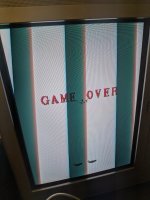
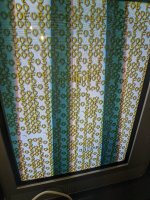
feels like I'm close, and than I forgot something super dumb at some point
forgot to flash one chip?
sound and prg/game logic is running perfectly, shapes and rotation/zooms too I'd say. (service menu shows up ok)
(edit : got the files on that org site)
I'm a bit confused with the dipswitches maybe? towards ON up top really means "OFF" like the manual shows?
thank you for any pointers
feels like I'm close, and than I forgot something super dumb at some point
forgot to flash one chip?
sound and prg/game logic is running perfectly, shapes and rotation/zooms too I'd say. (service menu shows up ok)
(edit : got the files on that org site)
I'm a bit confused with the dipswitches maybe? towards ON up top really means "OFF" like the manual shows?
thank you for any pointers
Attachments
Last edited:
nnap
Grand Master
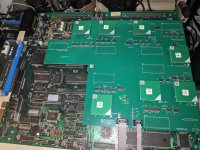
Make sure all the jumpers are set as per the manual. Also use a toothbrush with isoprop to clean the sockets on the board. When putting on the CPU multi board, start in the middle when pressing it down. Separate the video board from the cpu board when installing the multi boards, so you can hold your hand against the donor board when pressing down on the multi. Look through gap between the boards and make sure that you see the same portion of the pin on all of the sockets.
Shin
Enthusiast
thanks for the help!
yeah, did check the jumpers 4 times before powering ON, also did use isopropyl alcohol everywhere on the board, but did not especially brush the socket (I gently brushed everything)
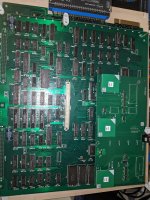
I did separate the boards of course, and checked to the best of my ability with a flashlight that the pins were pushed in right.
(I just reflashed the NORs on the video pcb (and everything on the main board but mpr/snd/voice), still the same result as shown above)
yeah, did check the jumpers 4 times before powering ON, also did use isopropyl alcohol everywhere on the board, but did not especially brush the socket (I gently brushed everything)
I did separate the boards of course, and checked to the best of my ability with a flashlight that the pins were pushed in right.
(I just reflashed the NORs on the video pcb (and everything on the main board but mpr/snd/voice), still the same result as shown above)
Last edited:
What game is your donor? Does this happen with just one game or all?
My donor is having somewhat similar issues and looks like my video board has bad RAM. Haven’t had time to look into it further, but only shows up on certain screens / levels of my donor game (Marvel Land).
My donor is having somewhat similar issues and looks like my video board has bad RAM. Haven’t had time to look into it further, but only shows up on certain screens / levels of my donor game (Marvel Land).
RepairGuy95
Champion
My donor works great & then randomly locks up.
Seems I am not alone with these boards being temperamental.
Seems I am not alone with these boards being temperamental.
Shin
Enthusiast
thank you!What game is your donor? Does this happen with just one game or all?
My donor is having somewhat similar issues and looks like my video board has bad RAM. Haven’t had time to look into it further, but only shows up on certain screens / levels of my donor game (Marvel Land).
I only tried assault and valkyrie for now (both are the same)
I think it was originally an Ordyne, converted to Phelios by @Caius
(I should have noted the jumper settings I changed)it had a polystyrene piece (1/4 of the board, verticaly) sandwiched in, to help with boards wraping/flexing I'm guessing(?) (I honestly don't see any btw, gap is straight) (I should have noted where the polystyrene piece was but forgot to and didn't put back in.)
Last edited:
Does Phelios run ok on the multi?
Shin
Enthusiast
just tried, just blue and yellow screen flashing on a loop, no music, sound or game