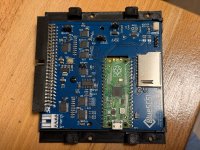
replacing scsi cd-rom drive with scsi sd card adapter?

I’m pretty sure the ZuluSCSI is made by the same creator as the SCSI2SD because they were no longer able to source parts

I’m a big fan of the BlueSCSI though
 
it just sits at looking at cd screen but if flex or press the scsibus chip i get what that link describes. i can quickly enough get into menu when i flex or press chip it tells me theres no files and it hangs
 
BlueSCSI V2 Desktop works with a CPS3 - You only need SCSI cable, no power cable required.

(bought one 2 months ago and added it to a friends CPS3)

Be aware that it may not fit into a case (or you need some tinkering) since it has a large footprint. (I added one to a Jason customs case with a custom made 3d Print)
 
Hello

I tried blueSCSI v2 (desktop) yesterday for first time.
It didn't work. Got a BIOS message complaining about the CD-ROM connection (in japanese), but probably because I missed something. It would be nice if someone here can point me up what I missed.

Related info
- BlueSCSI jumpers (see attached photo)
- ISO files from https://archive.org/download/Capcom_CPS3_ISO_CD_Images
- Log from BlueSCSI. It shows a warning about SD card class 4 being might be slow.
Platform: BlueSCSI
FW Version: 2024.12.08-rel Dec 8 2024 22:19:03
I2C Supported
Flash chip size: 2048 kB

=== SD Card Info ===
SD card detected, exFAT volume size: 3879 MB
SD Name: SD04G, MID: 0x03, OID: 0x53 0x44

=== Global Config ===
Config file bluescsi.ini not found, using defaults
Active configuration:
---- WARNING: Your SD Card Speed Class is 4. Class 10 or better is recommended for best performance.

=== Finding images in / ===
== Opening /CD10_2048-SFIII2nd.iso for ID: 1 LUN: 0
---- Configuring as CD-ROM drive based on image name
---- Image ready

=== ROM Drive ===
Platform supports ROM drive up to 1692 kB
---- ROM drive image not detected

=== Configured SCSI Devices ===
* ID: 1, BlockSize: 2048, Type: Optical, Quirks: Apple, Size: 66064kB

Initialization complete!
INFO: Pico Voltage: 3.217V.
 

Attachments

  • photo_2025-09-12_17-19-47.jpg
    photo_2025-09-12_17-19-47.jpg
    339.4 KB · Views: 37
@bubbly

Your log looks clean so i only can guess:

- The ISO files are the wrong ones (cant test those since i dont have a blueSCSI here and cant remember which ISOs i used for the friends CPS3) - Did you test other ISO/games?
- Maybe it is an issue with the card speed - Get a faster one
- your file naming is correct and bluescsi can read the file. Strange.
- Maye it is a protected game issue with the used BIOS? :)
 
Thanks for checking. I'll try later with a faster SD card.
About the ISOs, the link I shared was the only resource I found as full ".iso"s.
 
I am assuming you are using OEM 2nd imapct CD Cartridge with it? If you have the CD Drive can you test the SCSI cable to make sure there is nothing wrong there. Try a different SD card if you can. Can you rename the ISO to below and see if that helps.
CD10_2048-CPS3CUSTOM.iso
 
Last edited:
Yes, correct. it’s a 2nd impact cart without battery. It works without any problem with its original cd reader and cable

I’ll try the file rename
I’ll try to burn the 2nd impact ISO in a CD-R too. I assume that should work as the original CD? Do I need any special setting when burning it?
 
Last edited:
well CD Drives are too clumsy to use, I tested the 2nd Impact ISO that you shared in the links and it works well on my BlueSCSI, so try changing your SD and renaming the file, you might make it work.
1757690232215.jpeg
 
Back
Top