
You are using an out of date browser. It may not display this or other websites correctly.
You should upgrade or use an alternative browser.
You should upgrade or use an alternative browser.
DARKSOFT CHIHIRO TYPE 3: New Firmware !
- Thread starter Darksoft
- Start date


I get this error in Naomi CF and if trying to write the game.bin to the cf card directly. I will paste a few screen shots later today.where do you get this error ? Got a a PrtScr ?
I am opening Naomi CF as administrator.You have to be administrator.I'm getting an error when trying to write files to the CF card either using Naomi CF or copying them directly to the card.
ERROR: Security Sector Patch
I am using a usb to cf adapter.
What operating system are you on ?
I am on Windows 10 Home

IIRC it won't work on Windows 10.I am on Windows 10 Home

naomi cf stopped working back in windows 7 after certain update.
Is there a utility that works with Win 10?naomi cf stopped working back in windows 7 after certain update.
gcfi.exe was my preferred tool and shoould work under windows 10 as well.
Be aware that it won't work with the newest firmware as that no longer expects an encrypted sector on the compact flash card.
Maybe we will see a new version soon that can be used for both the older firmware and the newer firmware?
Or are you looking for a tool to get the 2 id's from the compact flash card?
Be aware that it won't work with the newest firmware as that no longer expects an encrypted sector on the compact flash card.
Maybe we will see a new version soon that can be used for both the older firmware and the newer firmware?
Or are you looking for a tool to get the 2 id's from the compact flash card?
I was looking for a tool to copy the GAME.bin and ABC.bin to a CF card for the new firmware, but it sounds like I should do it the old way until a new utility is created.gcfi.exe was my preferred tool and shoould work under windows 10 as well.
Be aware that it won't work with the newest firmware as that no longer expects an encrypted sector on the compact flash card.
Maybe we will see a new version soon that can be used for both the older firmware and the newer firmware?
Or are you looking for a tool to get the 2 id's from the compact flash card?

winteriscoming
Champion
That means that you can just copy+paste the files on your CF. No need to use any program or read the Read ATA IDENTIFY DEVICE data from your CF anymore.
Just copy the 2 files to the CF and you are good to go.
Is it not just a matter of copying/pasting the files onto the CF? Since I netboot, I've not used the CF method, but does the CF not present itself as writable media on your pc for dragging/dropping files? That's the impression I'm getting, but I'm genuinely curious what the method is for CF with the new firmware.I was looking for a tool to copy the GAME.bin and ABC.bin to a CF card for the new firmware,

No it is not.Is it not just a matter of copying/pasting the files onto the CF? Since I netboot, I've not used the CF method, but does the CF not present itself as writable media on your pc for dragging/dropping files? That's the impression I'm getting, but I'm genuinely curious what the method is for CF with the new firmware.
Here is the gist of it:
The CF card is formatted as standard FAT16
The PIC contains the name of the loader file i.e. ABC.BIN
The loader file: ABC.BIN contains the name of the game image to load and it's checksum.
For each game you copy to the CF card you have to recreate the loader file: ABC.BIN
The protection removed in the new firmware involves XOR of certain sectors. This is implemented in gcfi, meaning that if if you use gcfi the game will no longer load.
There is currently no tool which supports this new firmware.
That's right. Right now, no tool support it. You need to copy any ABC.bin + the file and then adjust manually the checksum inside the ABC.bin
@rtw, do you think it would help making a version of gcfi with a -noxor option so that it won't do the xor to that specific sector?
As I said, the goal is to avoid people having to know the DeviceID of their cards which is a PITA.
@rtw, do you think it would help making a version of gcfi with a -noxor option so that it won't do the xor to that specific sector?
As I said, the goal is to avoid people having to know the DeviceID of their cards which is a PITA.

I think it just needs detailed "for dummies" instructions.

hamster
Student
- Joined
- Jul 18, 2017
- Messages
- 87
- Reaction score
- 26
Thanks, I think removing the XOR check makes this more of a headache, it really isn't that hard to get card serial, We need to make a Arduino or something simple that can issue the ident command to get the data needed , or maybe modify the firmware to dump the key on the screen ( or the Serial Port ? ) when it errors out 
FYI.. Thanks for your guys ( @rtw & @Darksoft) support to the community
FYI.. Thanks for your guys ( @rtw & @Darksoft) support to the community

Mrhide
Legendary
so I am running Wangan maximum tune (1) in a wangan maxime tune 3 cab and I have the following issue:
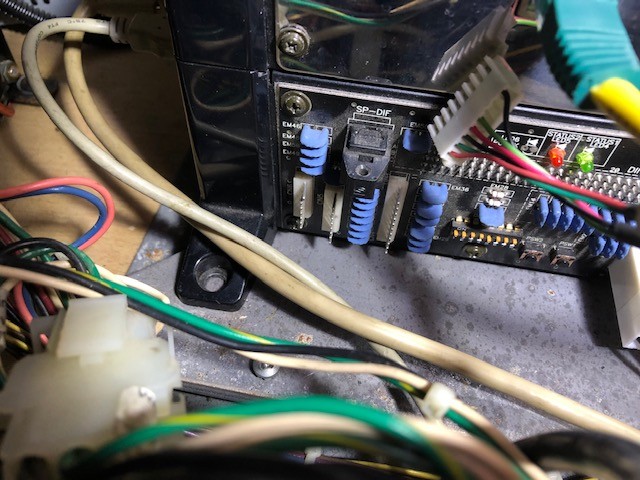
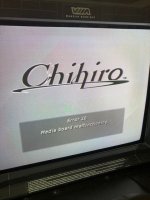
If I connect the 8 pin JST coming from the card reader and the STR2 J104 board ( so the 2 R TGND serial ) to the Chihiro CN5 8 pin connector, as per the wangan maximum tune 1 manual, I get a error 26 media board malfunctioning
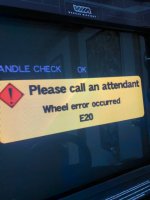
If I unplugged that CN5, I can go in the game, the wheel check comes on, motor goes right, goes left, and gives me an error E20 which sure enough, the manual tells you to "check connections".
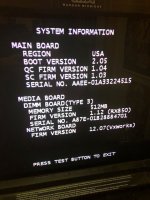
If I go and disable both the card reader and the wheel motor, I can go in and play, without the force feedback. Since the FFB is one of the reason I got the cab, I want it to work. Error 26 appearing to be related to the PIC, which I've burn from RTW instructions, and I can go in wangan and crazy taxi so I know is fine, got me searching and I am now thinking it could be firmware related. This is what I've got running now:
1- If I stick the bin from the first post on my pi, add it to the list of games and send it, will it bring all of these old numbers to the latest ones in one shot?
2- Anybody think or know it will help my FFB issue?
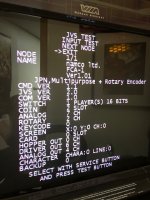
32- Can the JPN from the FCA board and the USA from the chihiro be related in any way to my issue?
Thank you for any help
If I connect the 8 pin JST coming from the card reader and the STR2 J104 board ( so the 2 R
TGND serial ) to the Chihiro CN5 8 pin connector, as per the wangan maximum tune 1 manual, I get a error 26 media board malfunctioningIf I unplugged that CN5, I can go in the game, the wheel check comes on, motor goes right, goes left, and gives me an error E20 which sure enough, the manual tells you to "check connections".
If I go and disable both the card reader and the wheel motor, I can go in and play, without the force feedback. Since the FFB is one of the reason I got the cab, I want it to work. Error 26 appearing to be related to the PIC, which I've burn from RTW instructions, and I can go in wangan and crazy taxi so I know is fine, got me searching and I am now thinking it could be firmware related. This is what I've got running now:
1- If I stick the bin from the first post on my pi, add it to the list of games and send it, will it bring all of these old numbers to the latest ones in one shot?
2- Anybody think or know it will help my FFB issue?
32- Can the JPN from the FCA board and the USA from the chihiro be related in any way to my issue?
Thank you for any help
Attachments
My first instinct is that there is a potential issue with the jumper settings that is causing the serial port to not communicate properly. I know some other hardware requires the jumpers set a certain way to function properly with certain serial devices.
of course a good first step is to get everything upgraded and region matched.
of course a good first step is to get everything upgraded and region matched.
Mrhide
Legendary
jumpers, not these dipswitch right?My first instinct is that there is a potential issue with the jumper settings that is causing the serial port to not communicate properly. I know some other hardware requires the jumpers set a certain way to function properly with certain serial devices.
of course a good first step is to get everything upgraded and region matched.
there are my jumpers on the media board:
...and back to question #1: Can I upgrade directly from the bin in the first post?
Thanks again for the help