Home Arcade System

"HD15 adapter PCB" and "8pin mini DIN to HD15 adapter PCB". They have very similar names and descriptions. Do they do the same thing?
They do the same thing, the PCB version was first far as I'm aware... The 8-pin mini din to HD15 adapter is newer.

Remember this adapter only really exists for two reasons.
  1. Support the Taito F3 for use with a OSSC
  2. Support HD15-to-BNC breakout cables for easy connection to/use with a Sony BVM/PVM
If you are NOT one of the above two types of people (no BVM/PVM and no F3) you should be asking yourself "what do I need the HD15 adapter for?"
Yea, because I haven't got a fucking clue either (aka why do so many people think they need this, just stop it already its NOT for you). :huh: ;)
 
Last edited by a moderator:
Can’t you treat it as a direct connection to the OSSC without the need of SCART connectors?

I’d say that’s a pretty big deal since SCART is so antiquated and cumbersome.
IF I could reduce my reliance on SCART I totally would.
 
240p content on OSSC honestly works best via SCART connection, the VGA/HD15 port is a "trick" IMO as you need to disable 75ohm sync to get it to work/lock.

Its sad OSSC decided to go with SCART...
I would have preferred a 8-pin mini din port (like the xRGB Mini "Framemeister") for use with a straight 8-pin mini din cable.

Alass you can get this SCART adapter from etim (and I highly recommend that you do, its amazing when paired with the HAS+OSSC)...
69m38SG.jpg


The ability to send audio separately, either from the HAS's 3.5mm output jack (attenuated JAMMA) or directly from an arcade PCB (RCA jacks on some boards) is simply fantastic.
Most importantly of all, it keeps the HAS in 75ohm/unbuffered sync settings (because its using the SCART port for 240p sources as intended) that seems to be compatible with the majority arcade PCBs.

Tim only calls the adapter "Cable set for NESRGB/2600RGB" because his NES and Atari RGB mods call for the use of 8-pin mini din ports.
It works perfectly with ANY device (including HAS) that follows this (new RGB scene) standard...

oihFBl6.jpg


I also use it with my RGB enabled PC Engine...
Entgf40.jpg
 
Last edited by a moderator:
Sorry for the n00b question, but am I right in thinking that if I wanted to only use a HAS with Sega Saturn controllers, I don't need to worry about kick harnesses?
 
Sorry for the n00b question, but am I right in thinking that if I wanted to only use a HAS with Sega Saturn controllers, I don't need to worry about kick harnesses?
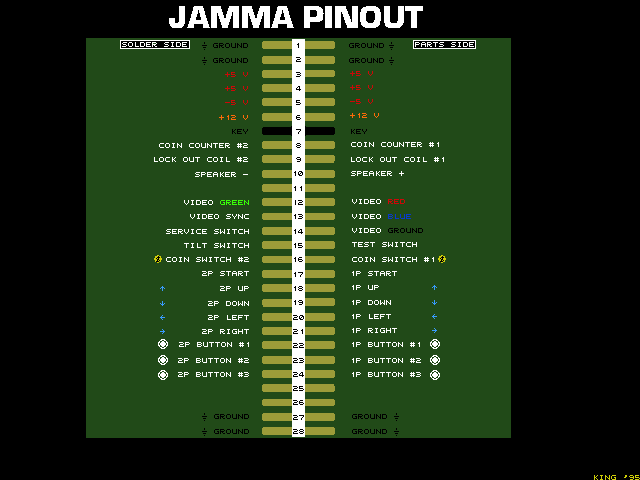
Yes, you do. The controller has nothing to do with it really. Jamma, as a standard, only transmits 3 buttons per player on the jamma edge (the thing that is connected to the HAS).

jamma_pinout.gif


So the HAS itself can only see those 3 buttons. plugging in a saturn controller will give you those buttons, but that's it. Certainly that's enough for a lot of games, but if you wanted to play any fighter, or anything with more than 3 buttons really, the extra buttons need to be connected from the motherboard to the HAS in the first place. That's what a kick harness will do for you. Sorry also to say that there's no 'standard' kick harness, but a lot of folks will use a CPS2 standard into the HAS, and get something like a JNX Raiden to convert from one format to the other.
 
Kick harness connects the HAS to the arcade PCB, allowing for buttons 4,5,6 to forward to the DB15 port (aka a complete supergun controller pinout).

Failure to do this will also fail to provide buttons 4,5,6 to the DB15-to-Saturn adapter.
 
Kick harness connects the HAS to the arcade PCB, allowing for buttons 4,5,6 to forward to the DB15 port (aka a complete supergun controller pinout).

Failure to do this will also fail to provide buttons 4,5,6 to the DB15-to-Saturn adapter.
Not exactly, since the HAS can output up to 6 buttons via the JAMMA edge (it's designed so that there is no conflict with the 6th button, don't worry :)), because there are games that don't make use of the kick harnesses (Atomiswave, MVS, multi-game PCBs and so on).

Just remember that you need a kick harness for the CPS1/2/3/ST-V and other systems that take buttons 4-6 via auxiliary connector instead of JAMMA, that's it.


About the HD-15:
Can’t you treat it as a direct connection to the OSSC without the need of SCART connectors?
You can, that's how I have my HAS connected with the OSSC, so far all my games have worked just fine. Now with the LPF on the newest HAS you can't even tell if the video is connected via the Scart (for which the OSSC can apply the LPF), or the HD-15.


I've just jumped on the recently re-opened pre-order, very excited!

I wondered if someone could clear something up for me. What would be the use case for the "8pin mini DIN to HD15 adapter PCB"? The description seems almost identical to the "HD15 adapter PCB" above it. Does it work in conjunction with this item? Looking at the pictures it looks like it converts the added VGA port back to a 8pin DIN, what would the advantage of this over the one on the base board? I've likely missed something very simple, apologies in advance!
Different form factor, the same function - both adapters simply output RGBS via the HD-15 connector. The reason there are two adapters is that:
1. The old HAS versions didn't use "modules", so the "8pin mini DIN to HD-15 PCB" is a workaround for owners of the old HAS.
2. Some people already own an 8pin mini DIN to 8pin mini DIN cable, so instead of adding a "HD-15 adapter PCB" to the HAS and using a VGA cable, they can use their 8pin mini DIN cable with that small "8pin mini DIN to HD-15 adapter PCB".
3. The "HD-15 adapter PCB" makes the HAS ~16.5mm taller, some people don't want that.


Also, does the HD15 adapter PCB fit underneath the plexiglass case of the HAS, or does this need to be removed to use it?
All modules/adapters fit underneath the plexiglass case of the HAS, they are supplied with extra spacers and bolts.

 
Wow. Plugging a Pandoras Box into a HAS... never thought about that.

BECAUSE THAT'S A HORRIBLE IDEA.
 
You can, that's how I have my HAS connected with the OSSC, so far all my games have worked just fine. Now with the LPF on the newest HAS you can't even tell if the video is connected via the Scart (for which the OSSC can apply the LPF), or the HD-15.
I'm going to try this. I'm currently running it through SCART, but I have the HD-15 add-on that I picked up from you in my last order. I assume I can just run my OSSC with the LPF for the VGA connection? The OSSC's LPF isn't only for the SCART Connection, is it?
 
The OSSC's LPF isn't only for the SCART Connection, is it?
It IS!
That's what RGB is saying here...
Now with the LPF on the newest HAS you can't even tell if the video is connected via the Scart
The newest version of the HAS has its own LPF, so you don't miss the fact the OSSC's only works via SCART input (again, yet another reason why this should be your goto port for 240p content IMO).
 
Wow. Plugging a Pandoras Box into a HAS... never thought about that.

BECAUSE THAT'S A HORRIBLE IDEA.
Yeah, that seems counter intuitive. Those pandora's boxes run like ass too.
 
Great...now I have to consider upgrading my HAS again!! I just upgraded from V2.1 to V3.2 this passed November.
 
now I have to consider upgrading my HAS again!! I just upgraded from V2.1 to V3.2 this passed November
All for that onboard low pass filter?
Don't get me wrong, its great that HAS has continued to evolve like this... A great device getting even greater over time!

I think you would be better off just getting that 8pin mini din to SCART adapter I linked and using the LPF of the OSSC itself tho.
 
now I have to consider upgrading my HAS again!! I just upgraded from V2.1 to V3.2 this passed November
All for that onboard low pass filter?Don't get me wrong, its great that HAS has continued to evolve like this... A great device getting even greater over time!

I think you would be better off just getting that 8pin mini din to SCART adapter I linked and using the LPF of the OSSC itself tho.
Yeah i know it doesn't sound worth it, but my ultimate goal over the course of how ever long it'll take, is to eliminate the need to support SCART altogether.

I do currently have the 8pin Mini DIN to SCART adapter that RGB used to supply. It's very similar to the one you linked, but instead of the 3.5 mm mini stereo jacks, it has the Red and White RCA jacks.

But eventually I want to be SCART-free.
 
But eventually I want to be SCART-free.
I do hear ya brother... I tried to fight the power that is SCART myself with 8 pin mini din.
Problem is the tide was just too strong, it wasn't that we were wrong.

Devices like the Hydra and GSCART sealed our fade/doom/whatever.
That being said, not much I've used as sweet as this 8 port auto switching SCART mega box called Hydra. ;)
 
Is there a way to check on the options that I entered when I went on the HAS preorder? For the life of me, I can't remember which one I spec'd out. I want to make sure that I have the right AV cable. Definitely excited because I already received my power supply and wired up the IEC power cord. Now focusing on AV.
 
Back
Top