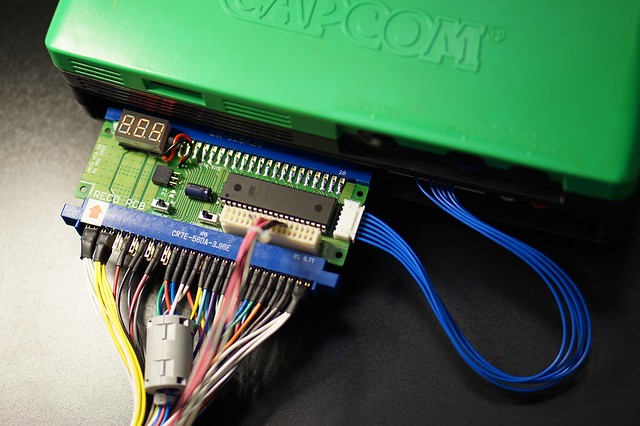
Home Arcade System

Please reach out to the manufacturer of that adapter for more details.
I don't think French will give any answer. Anyway their solutions should be based on simple Arduino libraries which shouldn't add much lag. I know "not much lag" isn't a scientific measurement.

Regards.

Locutus73
 
Perhaps @undamned could chime in, but I think if you leave the UD Decoder connected while powered, you might be able to just swap out the USB cable and it should initialize the new stick.
 
I'm looking at the markings on the HAS PCB and +5 is yellow and +12 is red, so that is how I hooked up. Just want to triple check before I turn on since the jamma connector is the reverse of those colors.
 
Just want to triple check before I turn on since the jamma connector is the reverse of those colors.
Yes RGB used his own color coding system on the wires.
This is actually how I killed @Derick2k 's HAS... I wired it like a PC power supply and didn't ever check the bottom of the HAS PCB to verify what I was actually connecting.

Normally I think of green as earth ground, nope in HAS green is -5v
Normally I think of yellow as +12v, nope in HAS yellow is +5v
Normally I think of red as +5v, nope in HAS red is +12v

:S :huh: X/

I really do love the RGB HAS, but if I was to criticize anything...
Yea standards exist for a reason, sure this isn't a PC power supply but using/re-using all the same colors when some of us have been working in the PC space for 20+ years wasn't a "good" move.

For reference this is what happens to a HAS when you feed +12v into the +5v input.
NB6iKME.jpg


You can see with the caps/chip removed it got so hot it actually melted the PCB a little.
VSyO2wJ.jpg


It took less than 2 seconds of juice for this damage to occur, so please double and triple check that input voltage (or you'll be replacing a burned-out HAS for your buddy like I did ;) )!
 
Last edited by a moderator:
I'm looking at the markings on the HAS PCB and +5 is yellow and +12 is red, so that is how I hooked up. Just want to triple check before I turn on since the jamma connector is the reverse of those colors.
Check out the pinout of the power connector on the bottom of the HAS PCB to make sure.

@jassin000 - I saw those pics, ouch :/ I know it kind of sucks it doesn't follow ATX PSU colors, but thing is, one should read the manual and never assume. If you check the official Sega JAMMA loom it's very similar, white = GND, yellow = +5V, red = +12V. They don't wire -5V so I just randomly picked green. The colors were introduced early in the HAS production (V1), so I decided to stick with that.

23452318915_a7d87cc9cd_z.jpg
 
Last edited:
I know it kind of sucks it doesn't follow ATX PSU colors, but thing is, one should read the manual and never assume.
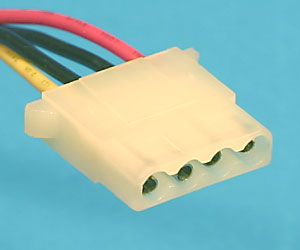
100% agree, it was totally my bad.
It's even printed directly on the bottom of the HAS PCB.

I just wish you had used colors like Purple, Orange, White... Just so it could never be confused with this (Yellow, Black, Red)...
peripheralindex.jpg
 
Quick question:
I have the HAS with a few UD Decoders and friends that bring their own fightsticks to play ST. I was wondering is it safe to unplug and plug controllers while the HAS is powered on?

For instance: if one person is done playing, can they unplug their fightstick and another person plug in theirs if they want to jump in?
I killed a power supply by plugging in my UD Decoder with the HAS powered on, so I wouldn't recommend it. Luckily the HAS was fine, but it was quite the newbie wake up call. =O
 
If anyone is looking for a scart-cable, here is the one I purchased and it works great:
http://www.oldskoolconsoles.com/product-page/rgb-scart
For us EU guys, there's http://www.oldskoolconsoles.com/
They don't have pics of the cable, but they do stock them (at least they did a week ago). Be warned though, it's DIY and somewhat fiddly. See instructions here. Also, mine didn't come with the audio cable, which is a regular male to male headphone cable.
Ok, so http://www.oldskoolconsoles.com/product-page/rgb-scart-n64 seems to be the right place to order the 8 pin mini DIN to SCART RGB adapter from Europe, but the order page has a dropdown menu for choosing between "Frontloader / Toaster / Toploader" model and "Famicom AV / N64 / NTSC SNES" model. I suppose the "Frontloader / Toaster / Toploader" should be the right option, but I'm not sure. I tried to send an email to [email protected] but I didn't receive any reply yet. What did you order guys?

Thank you in advance.
Best regards.

Locutus73
 
I killed a power supply by plugging in my UD Decoder with the HAS powered on, so I wouldn't recommend it. Luckily the HAS was fine, but it was quite the newbie wake up call. =O
This seems really strange to me. How could this technically happen?

Regards.

Locutus73
 
I killed a power supply by plugging in my UD Decoder with the HAS powered on, so I wouldn't recommend it. Luckily the HAS was fine, but it was quite the newbie wake up call. =O
This seems really strange to me. How could this technically happen?
On the HAS DB15 pin connector you have 5V on pin 8 and GND on pin 1. On the HAS you also have the shield connected to GND.

If you are inserting a connector like this:

412dFeF8S3L._SY355_.jpg


You can easily short the 5V to GND thus shorting your supply.
 
Last edited:
Seems pretty unlikely one would manage to make inadvertent contact between pin 8 and the shield/gnd? I mean it's a female connector, the pins aren't openly exposed.

I also don't see the need to gnd the shield. Sure for a video or audio connection that makes sense but not for controller inputs.

I tested this scenario with my sgun and snes adapters and have yet to damage anything. I still think it's best to have everything turned off before making power connections but it really shouldn't blow things up.
 
Quick question:
I have the HAS with a few UD Decoders and friends that bring their own fightsticks to play ST. I was wondering is it safe to unplug and plug controllers while the HAS is powered on?

For instance: if one person is done playing, can they unplug their fightstick and another person plug in theirs if they want to jump in?
I killed a power supply by plugging in my UD Decoder with the HAS powered on, so I wouldn't recommend it. Luckily the HAS was fine, but it was quite the newbie wake up call. =O
Wow, that sucks!! Maybe it was a weak psu/about to die?? Maybe @RGB can explain how the joystick ports are powered on the HAS? Directly from the PSU??

It should be ok to plug/unplug the usb joystick, not the UD Decoder itself from the HAS while powered?!
 
I think I missed the last batch but can I be added to the list when you add more has units for presale? Thanks.
 
PSUs usually have some protection circuits (SCP, OCP, OCP/UVP etc.), but weird stuff can happen regardless. Have you checked if the fuse inside the PSU is ok?

Regarding the grounded DB15 connector shield - I don't even want to get into much details, but why would some shield for signal lines against EMI and all sorts of stuff the cable can potentially pick up be a bad idea? (sometimes very long cable, too, I personally build a 5m long DB15 to DB15 cable for a member here). Remember there's a microcontroller on HAS and it relies on the built-in I/O protections only. As for improvements, I'll look into resettable fuse for the +5V line that goes to the DB15 connector.

Again, the instruction for HAS says one mustn't connect/disconnect cables, controllers and other accessories while the device is powered on.

@kadrik0 - added you to the list, thanks for interest!
 
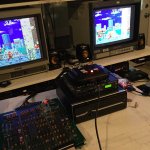
ok somewhere in here someone mentioned extron rgb 203 rxi. I have one so figured hey why not play with it and make my chain here more stupid. Ok so if I don’t enable ddsp I can only get one of my monitors to sync. Without it you get some centering controls, but they don’t work very well, I’d say they are pretty much useless. You can kind of move the image left and right if your monitor even syncs, but up and down don’t do anything. With ddsp enabled ninja gaiden syncs to all my monitors just fine. I’m not sure exactly what that does. What the extron does give you is a level boost which is kind of nice and you get a nice little display telling you the signal coming in which is kind of sweet if you are as nerdy about this shit as I am. I’m thinking I might use this for my supergun here, a raspberry pi, and a mist fpga and I can switch all that stuff through this box. Saves some slots on my 16x8 extron and really I’ll only play one of those things at a time. One thing is I had to split sync from the supergun. I’m using a sync strike, seems to work fine. So chain here is jamma board to neotropolis supergun to sync strike to extron rgb 203 rxi to extron crosspoint to a Sony PVM 1943 md and I have two Olympus oev203. Just one of the Olympus monitors is in the picture. Box under the rxi has an arcade supply in it that I am going to use with the supergun because I’m stupid and dint realize this supergun doesn’t supply -5v.

Anyway for anyone still with me, what is ddsp really and maybe I’m better off without the rxi in the chain. It does give me some switching though.
 

Attachments

  • 2871393D-A966-4589-B575-18595F11C5E6.jpeg
    2871393D-A966-4589-B575-18595F11C5E6.jpeg
    344.3 KB · Views: 354
Haha tried buster bros and I couldn’t get that to sync no matter what I did on the rxi. Vertical just rolled. Fun stuff. So I bypassed the extron and sync strike and it was fine. So testing two boards I would say this is probably not worth the hassle. Can’t say I understand why it synced ninja gaiden fine but not buster bros.
 
Back
Top